While the UI design of
One UI 7.0 has leaked multiple times in the past, including through
our own video, it wasn't the final version. Samsung was still making changes to the UI design. Compared to those versions, the company seems to have improved a few things, and the near-final UI design for One UI 7.0 has now leaked, weeks before the beta software release.
One UI 7.0 design and features leak
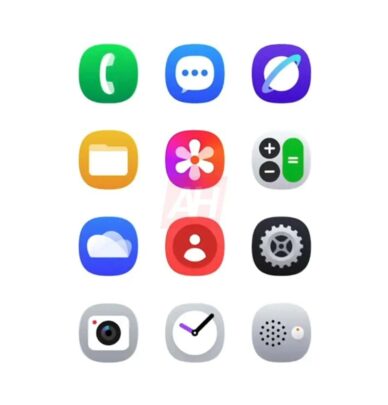
Android Headlines has managed to grab a few images and videos of One UI 7.0. As you can see in one of the images below, Samsung has improved the stock app icons for some apps compared to the previous leak. In the previously leaked images and videos, app icons for Camera, Contacts, and Gallery weren't very good-looking, but the newer ones definitely look better.
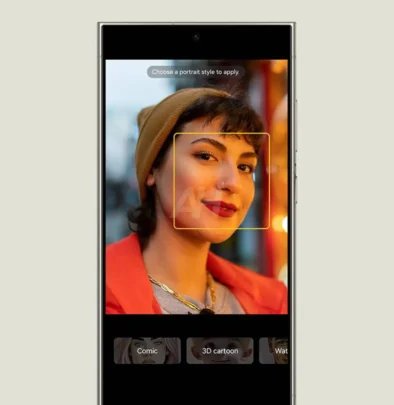
One of the images showcases AI Portrait Studio's new design, where image styling is displayed below the image that you are actually editing. There also appears to be a new app called Cloud, which could be the central place where your images, videos, files, contacts, messages, and call logs are backed up.
The video below shows all the new stock app icons, some new widgets, and the pill-shaped animation for ongoing activities (like charging, music player, timer, and voice recorder) in the video below. You can also see the new two-page Quick Panel, featuring new quick setting toggles, a new music player widget (with an icon for Galaxy Buds when connected), and new sliders for brightness and volume.
https://www.sammobile.com/wp-content...sign-Icons.mp4
The new design for Samsung Health is showcased in the video below. It shows the Energy Score feature and AI-powered health recommendations and summaries.
https://www.sammobile.com/wp-content...h-Features.mp4
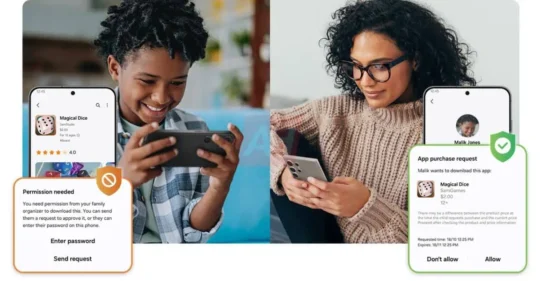
Samsung also seems to be bringing improved Parental Controls to Galaxy smartphones and tablets.
The post
Breaking: Massive leak reveals One UI 7.0 design and features appeared first on
SamMobile.
More...