View Single Post
  #1  
Old 12-02-2024, 06:41 PM
phillynews215's Avatar
phillynews215 phillynews215 is offline   Thread Starter  
I'm A Community Feed Poster

  puertorico
 
Join Date: October 11th, 2009
Posts: 13,274
Downloads: 0
Uploads: 0
phillynews215 Knows Their Stuffphillynews215 Knows Their Stuffphillynews215 Knows Their Stuffphillynews215 Knows Their Stuffphillynews215 Knows Their Stuffphillynews215 Knows Their Stuffphillynews215 Knows Their Stuffphillynews215 Knows Their Stuffphillynews215 Knows Their Stuffphillynews215 Knows Their Stuffphillynews215 Knows Their Stuff


View phillynews215's Profile   Edit Options Edit Profile Picture View phillynews215's Photo Album Add phillynews215's to Your Contacts Show Groups Edit Avatar Subscribed Threads Private Messages
Default PSA: Here’s how to make sure Gmail’s tracking all your holiday packages

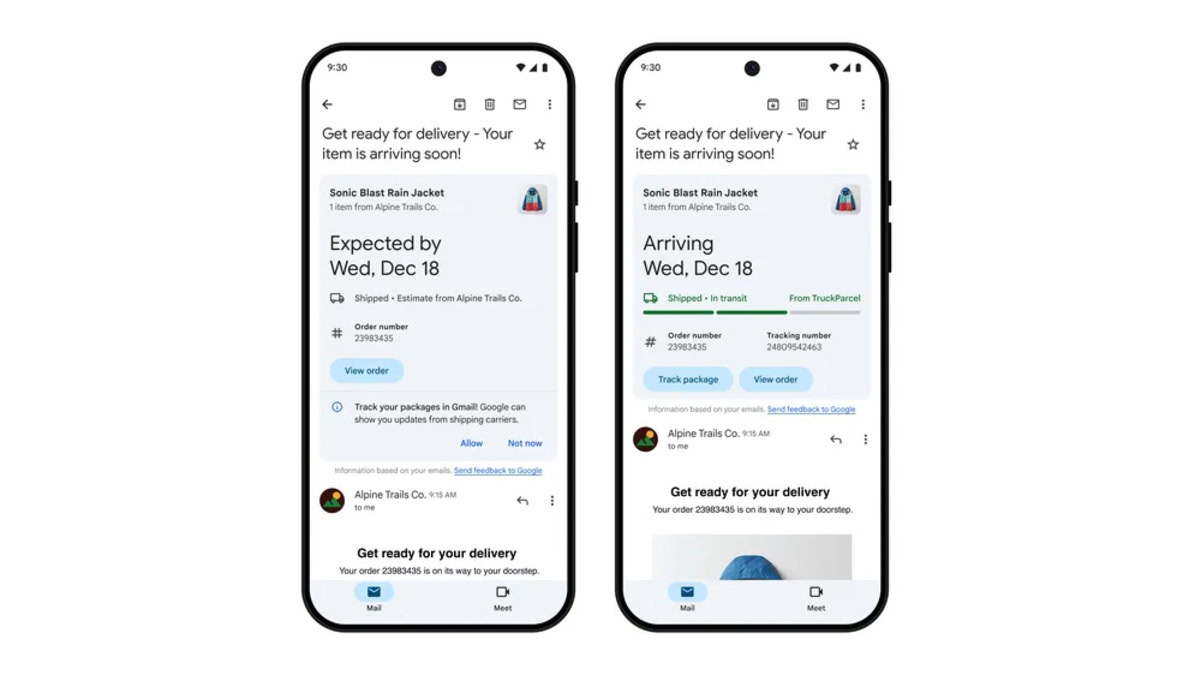
Credit: Google


  • Gmail is able to track your shipments in real time.
  • However, users have to opt-in to package tracking by clicking on “Allow” at the bottom of the summary card.
  • You can also opt out of tracking if you want.

With the holidays fast approaching, you want to make sure you’re package will arrive in time. Although Google added package tracking features to Gmail back in 2022, you still probably found yourself going to the carrier’s website to check on the latest status of your delivery. Gmail recently added the ability to get status updates in real-time, but you may not have known you need to opt-in first.

Earlier this year, Google announced changes were coming to Gmail’s summary cards — the box that appears at the top of an email to provide information about orders and deliveries. These changes included a new look, new action buttons, and updates in real time.


More...
Reply With Quote