

• Home
  • Download
  • Links
  • Photoplog
  • Blowfish Secret
  • Base64
  • Wordpress Salt
  • Contact
  • ROM
  • Skins
  • VIP
  • Tutorial
Wckediden - Mobile Tricks and Tweaks Community  

Go Back   Wckediden - Mobile Tricks and Tweaks Community > Outdated Mobile Resources Community Channel - (Archived And Read Only) NO POSTING !!! Read Only > Skins Forum > Wisbar Advance (Desktop) Skin/Theme > Wisbar Advance Desktop
Reload this Page RedDawn
Wckediden
Register Forum Rules FAQ Members List Social Groups Search Today's Posts Mark Forums Read

Notices
Under Construction

WckedIDen Forum Renovations

WckedIDen is currently undergoing forum structure renovations. During this process, you may experience intermittent errors, unavailable pages, or temporary service interruptions.

Please be patient while we work to improve the forum. We appreciate your understanding and continued support.


Community Links
Social Groups
Pictures & Albums
Members List
Meet Our Staff
Search Forums
 
Tag Search
Advanced Search
Search Downloads
Advanced Search
Search Links
Advanced Search
Find All Thanked Posts


Post New ThreadReply
 
Thread Tools
RedDawn Details »»
RedDawn
MOD Settings
Add a Comment
About The Supporter
JudgeDredd's Avatar
About Supporter
 
Version: , by JudgeDredd (Wcked Member) JudgeDredd is offline
Supporter Last Online: Jan 2009 Show Printable Version Email this Page

Version: WM 6.1 Rating:
Released: 12-21-2008 Last Update: Never Installs: 0
 
No support by the author.

This is a skin that started as me just using the default skin in WAD then adding and moving and this is how it ended. Nothing special, nothing fancy just plain ol functionality that's it. Some of the images are borrowed and edited ( if you see your stuff in this theme then shoot me a pm and I will add you some credits here, because I can't remember where I got most of it ) some are mine but and the instructions are simple. Just unpack the file and move it to your "Storage Card" then search for the new theme and use them.

Things you need to know:

The red is kind of Christmasy (hee hee) or should it be (ho ho)

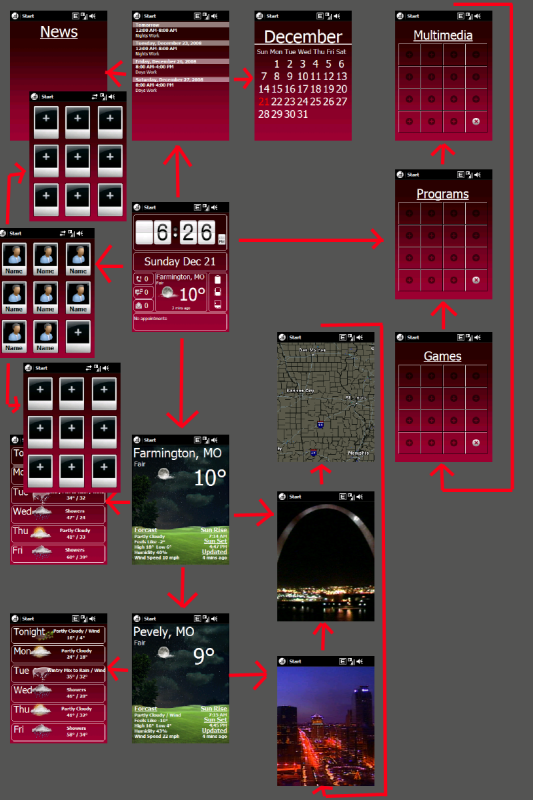
The main weather screens, the backgrounds change with changing conditions

The frames on the main page are buttons try tapping on some of them

Moving from page to page is done by gestures

Some pages like the contacts and radar and program pages cycle using the up and down gesture but the left or right gesture takes you back to the main page

There are a lot of extra images in the image folder that are not used but may be helpful for our own customization.

Crappy pic of how things are laid out.


I am sure there is more but I can't think of anything right now

Sorry for the Rapidshare mirrors are welcome

http://rapidshare.com/files/175638761/RedDawn.rar.html

Show Your Support

  • If you like to thanks you by the author -> Click Thanks to the Author
  • This modification may not be copied, reproduced or published elsewhere without author's permission.
The Following 2 Users Say Thank You to JudgeDredd For This Useful Post:
D/\SH (12-21-2008), Mike20PR (12-21-2008)
Post New ThreadReply

Tags
reddawn

« Previous Thread | Next Thread »

Currently Active Users Viewing This Thread: 1 (0 members and 1 guests)
 
Thread Tools
Show Printable Version Show Printable Version
Email this Page Email this Page

Posting Rules
You may not post new threads
You may not post replies
You may not post attachments
You may not edit your posts

BB code is On
Smilies are On
[IMG] code is On
HTML code is Off

Forum Rules


All times are GMT -4. The time now is 07:21 AM.

Wckediden Community - Archive - Privacy Statement - Terms of Service - Top


Powered by vBulletin® Version 3.8.14
Copyright ©2000 - 2026, vBulletin Solutions Inc.
Template-Modifications by TMS
POWERED BY PHILLYFINESTSERVERSTAT FOR WCKEDIDEN|- NEXTELELITE| - PPCTHEME| - IDENINSIDER


