 |
|

|
|||||||


  |
|
|
Thread Tools |
|
#1
 11-16-2025, 10:30 PM
|
||||
|
||||
 Gemini’s Nano Banana AI comes to Galaxy AI Now Brief, here’s how it works
Samsung has released an update for Galaxy AI's Now Brief feature that adds Nano Banana image creation. For those unaware, Nano Banana is Google’s small but surprisingly powerful image-editing AI. You drop in a photo, type what you want changed, and it handles the rest, whether that’s swapping the background, adjusting the mood, or completely remixing the scene.
Nano Banana is already part of the Google Gemini suite and available through the Gemini app on Galaxy devices. But with the latest update to the Personal Data Intelligence app on phones that support Now Brief, Samsung is taking things a step further. Now Brief now includes a Nano Banana image-generation card. It pulls a random selfie or front-facing photo from your gallery and offers a few ready-made prompts you can tap to instantly generate an AI-transformed version of that picture. Have some fun with your selfies at the end of the day Once you update to the latest version of the Personal Data Intelligence app from the Galaxy Store, you’ll see a new toggle for Nano Banana image creation under the Content to include section in Now Brief’s settings. Turn it on, and your phone will automatically pick a random image from your gallery at the end of each day, the same time Now Brief generates its daily Memories recap. 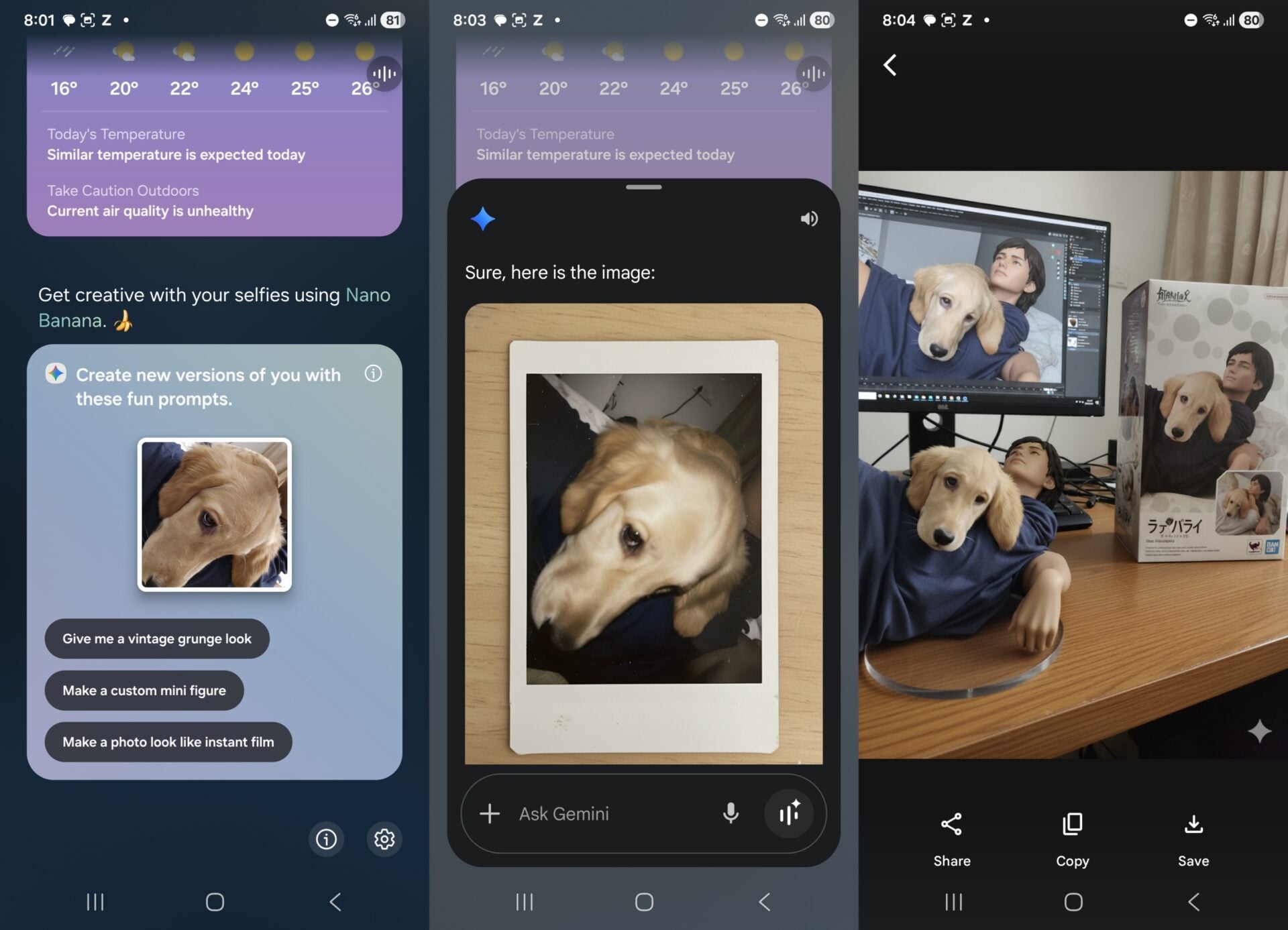 The image Now Brief picks can be anything from your selfies to photos of your pets. When you tap one of the suggested prompts, the Gemini app pops up and immediately uploads the selected photo to Google’s servers to work its AI magic. You can save, copy, or share the result right away as soon as Gemini finishes the transformation. Here's how the feature works from start to finish: The results aren’t always great, but that’s mostly because AI image generators can be hit or miss. All Now Brief is really doing is picking a photo and creating some prompts so you can have a bit of fun with AI at the end of the day. For more control, try the Gemini app or Galaxy AI Drawing Assist You can also manually pick and edit images in Google Gemini and use your own prompts. Just open Gemini by long-pressing the power button or using the app shortcut, tap the + button to choose a photo from your gallery (or take a new one with the camera), and then type in whatever you want Gemini to do with it in the text field. Don’t forget: Google’s AI image generation is also built into Galaxy AI’s Drawing Assist feature. You can sketch something and have it turned into a more polished or artistic version, or skip the drawing entirely and create an image from a text prompt. You can access Drawing Assist from the Edge panel, just like Now Brief. The post Gemini’s Nano Banana AI comes to Galaxy AI Now Brief, here’s how it works appeared first on SamMobile. More... 
|





|
«
Previous Thread
|
Next Thread
»
| Currently Active Users Viewing This Thread: 1 (0 members and 1 guests) | |
|
|

All times are GMT -4. The time now is 01:39 PM.