 |



 Official Vogue/Touch rom 3.03.651.4_2 for CDMA versions ONLY Details »»
|
|||||||||||||||||||||||||||
|
Official Vogue/Touch rom 3.03.651.4_2 for CDMA versions ONLY

Supporter Last Online: Nov 2009 

Well looks like its out and its finally here vogue users!!!! Its posted on the HTC site and u can get the rom thru the link I posted and thru the rapidshare link I added aswell....
Need to know: -If you have unlocked your device to run custom roms: You CAN simply just flash over to this rom!!!! -If you have the stock rom ON your device that it came with: You DONT need to unlock so you CAN simply just flash over being this is a CUSTOM rom!!!! -CDMA users ONLY!!!!!! If you have a carrier BESIDES sprint please DONT LET THE CUSTOMIZATIONS BEGIN...AS SOON AS YOU SEE THE COUNTDOWN JUST SOFT RESET Why update the ROM on your device? The software upgrade posted below provides several key enhancements for your Touch: 1. Upgrades the operating system from Windows Mobile 6.0 Professional to Windows Mobile 6.1 Professional 2. EV-DO Rev. A functionality for faster download and upload speeds when utilizing data services wherever EV-DO Rev. A coverage is available. 3. Advanced GPS functionality including the Sprint Navigation application. 4. Adds the Opera browser. 5. Adds a full Qwerty on-screen key Qwerty keyboard Please read the following important notes before starting the upgrade: Before you proceed, please confirm that this software upgrade is a newer version than what is currently loaded on your device. If it is the same version and your device is operating normally, there is no need to reload the software. To determine what version is running on your device, refer to the image on the left (the newest version is pictured) and note the ROM version and Radio version. Next, go to Start > Settings > System Tab > Device Information on your device. If your ROM and Radio versions are different than what is pictured at left or the ROM Date is older, you should upgrade. Screenie: 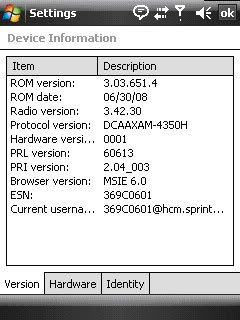 Before you run the ROM Upgrade Utility (RUU), make sure you check and do the following first: 1. If you are having challenges connecting with ActiveSync, please try the following on your device: Start > Settings > Connection Tab > USB to PC and de-select Enable advanced network functionality. 2. The standby and hibernation modes are disabled on the computer. Click here to view instructions on how to do this. If using a laptop, make sure your laptop is plugged into a power source. 3. All running applications on the computer have been closed. 4. Ensure that your device has a battery level of at least 50% (Start > Settings > System Tab > Power > Battery Tab). If the battery "dies" during the upgrade process, there is a chance that it will not recover and will need to be sent for repairs. 5. The update can take up to 25 minutes so set aside time when you will not be interrupted. 6. All data will be deleted from the device during the upgrade (music, pictures, 3rd party applications, etc); be sure to back up all of your data using ActiveSync (Windows Mobile Device Center, if you are running Windows Vista) prior to upgrading. Click here to view detailed instructions on backing up your data using ActiveSync. 7. Do not interrupt the upgrade process or press any buttons until the process has been completed (the device will reset itself when the update is done). General Procedure on Installing the ROM Update: 1. Back up your personal data from the Mobile Device to your computer using ActiveSync (Windows Mobile Device Center, if you are running Windows Vista) if you want to ensure you don't lose any of your data. Click here to view detailed instructions on backing up your data using ActiveSync. 2. On your computer, run the ROM Update Utility (RUU) to install the ROM update to your Mobile Device. Click here to view detailed instructions on installing the ROM update. 3. Restore your personal data back to your Mobile Device using ActiveSync (Windows Mobile Device Center, if you are running Windows Vista). (Optional) Click here to view detailed instructions on restoring your data using ActiveSync. WARNING: During the upgrade process, do not attempt to make/receive calls, press any buttons on your device or disconnect the device from the USB cable as this will stop the update and your device will be rendered inoperable!!! AFTER FLASHING THIS ROM PLEASE TURN OFF DEVICE,TAKE BATTERY OUT, AND HARD RESET....PLEASE TURN OFF DEVICE,TAKE BATTERY OUT,AND HARD RESET Links: http://www.htc.com/us/faq_detail.aspx?p_id=76&act=sd Mirror: http://rapidshare.com/files/13068636..._2.04_Ship.exe Download Now
Show Your Support
|
|||||||||||||||||||||||||||

 About Supporter
 No support by the author.
| The Following 4 Users Say Thank You to broSki For This Useful Post: | ||
| Comments |
|
#2
 07-18-2008, 04:16 AM
|
||||
|
||||
 Re: Looks like the real Official rom is out for the vogue rom 3.03.651.4
Installing right now! I have one report on PPCGeeks that it worked perfectly and hes testing now
I will report back once the installation is done too 
|


|
#4
07-18-2008, 01:01 PM
|
||||
|
||||
|
Re: Looks like the real Official rom is out for the vogue rom 3.03.651.4
Dling it NOW! Thanks! Flashing tonight!
|

|
#5
07-18-2008, 01:27 PM
|
||||
|
||||
|
Re: Looks like the real Official rom is out for the vogue rom 3.03.651.4
here is some updates posted by boogsie at ppcgeeks letting us know there is differences between this rom and dcd "official"rom form july 10th:
“ Quote ”I compared the last two RUU_WWE's and while the 2.nbh file did change, everything else was the same.
I compared the contents of the 2.nbh files and the changes apperar to be very, very minor. SYS folder is identical (binary comparison) except for \Metadata\default.hv OEMDrivers folder is identical except for a single DSM file and the corresponding RGU file. The difference in the RGU file was one single line: "ROMVersion"="3.03.651.6" This, in contrast to the filename and the update screen, which both include: "3.03.651.4" One difference that does draw my attention is that the PPST CAB files have the same names (PPST_08516_7500_SPCS_2.04.sa.CAB) but the files are different and the file contents are quite a bit different. Other than these items, the differences seem to be limited to the way that the released build was packaged ... For example, the last leaked build had nested in the OEM\OperatorPKG\Hidden.cab file, another cab file that included "Telus_NIM" which is not present in today's released build. Best regards, -boggsie
|
|
#6
07-18-2008, 03:10 PM
|
||||
|
||||
|
Re: Official Vogue/Touch rom 3.03.651.4_2 for CDMA versions ONLY
Posted via Mobile Device
well what does that mean? lol
|
|
#7
07-18-2008, 03:22 PM
|
||||
|
||||
Re: Official Vogue/Touch rom 3.03.651.4_2 for CDMA versions ONLY
“ Originally Posted by dette
|

|
#8
07-18-2008, 05:27 PM
|
||||
|
||||
Re: Official Vogue/Touch rom 3.03.651.4_2 for CDMA versions ONLY
“ Originally Posted by broSki
|
|
#9
07-18-2008, 06:22 PM
|
||||
|
||||
Re: Official Vogue/Touch rom 3.03.651.4_2 for CDMA versions ONLY
“ Originally Posted by dette
|
|
#10
07-18-2008, 06:26 PM
|
||||
|
||||
|
Re: Official Vogue/Touch rom 3.03.651.4_2 for CDMA versions ONLY
Ok so my rom version is 3.03.651.2 should I upgrade or does it really matter????
|
|
#11
07-18-2008, 08:12 PM
|
||||
|
||||
|
Re: Official Vogue/Touch rom 3.03.651.4_2 for CDMA versions ONLY
I CAN CONFIRM! Sprint NAV and Sprint TV WM6.1 OFFICIAL! FLASHED and RUNNING IT NOW! Nice improvements!
|
|
#12
07-18-2008, 09:34 PM
|
||||
|
||||
|
Re: Official Vogue/Touch rom 3.03.651.4_2 for CDMA versions ONLY
So far wait cursors aren't working on this ROM. Ill post in here and edit my post as, I get issues with other apps.
|
|
#13
07-18-2008, 11:35 PM
|
||||
|
||||
|
Re: Official Vogue/Touch rom 3.03.651.4_2 for CDMA versions ONLY
i wonder why htc removed the rom already from their website?
|

|
#14
07-19-2008, 12:44 AM
|
||||
|
||||
Re: Official Vogue/Touch rom 3.03.651.4_2 for CDMA versions ONLY
“ Originally Posted by bondsingh
|
|
#15
07-19-2008, 01:04 AM
|
||||
|
||||
Re: Official Vogue/Touch rom 3.03.651.4_2 for CDMA versions ONLY
“ Originally Posted by BiG JeW
|
|
#16
07-19-2008, 10:51 AM
|
||||
|
||||
|
Re: Official Vogue/Touch rom 3.03.651.4_2 for CDMA versions ONLY
Flashed this ROM yesterday. Everything worked the first time, GPS included. Installed GoogleMaps and it works with GPS also. Used "get directions" and followed the blue line on the map. I guess now I won't get lost.
The only thing I have found that doesn't work is the htchome-2.1-hermes-n2a.cab home plug-in. Installing this causes the phone to lock up, hard reset is the only thing that fixed it. HTC Home customizer seems to work fine. The home plug in that I got to work was Kaiser's 6-Tab.
|
|
#17
07-19-2008, 04:02 PM
|
||||
|
||||
Re: Official Vogue/Touch rom 3.03.651.4_2 for CDMA versions ONLY
“ Originally Posted by BiG JeW
|
|
#18
07-19-2008, 04:04 PM
|
||||
|
||||
|
Re: Official Vogue/Touch rom 3.03.651.4_2 for CDMA versions ONLY
simple question.... is it worth it??? or should i wait for a new custom one????
|
|
#19
07-19-2008, 05:07 PM
|
||||
|
||||
Re: Official Vogue/Touch rom 3.03.651.4_2 for CDMA versions ONLY
“ Originally Posted by b()riku/\ m()dz
|
|
#20
07-19-2008, 05:11 PM
|
||||
|
||||
|
Re: Official Vogue/Touch rom 3.03.651.4_2 for CDMA versions ONLY
Are you saying they arent releasing the update anymore? or whats going on?[/QUOTE]
no they are releasing it but it will be on monday.
|
|
#21
07-19-2008, 05:13 PM
|
||||
|
||||
Re: Official Vogue/Touch rom 3.03.651.4_2 for CDMA versions ONLY
“ Originally Posted by D/\SH
|
|
#22
07-19-2008, 05:36 PM
|
||||
|
||||
Re: Official Vogue/Touch rom 3.03.651.4_2 for CDMA versions ONLY
“ Originally Posted by b()riku/\ m()dz
|
|
#23
07-19-2008, 05:50 PM
|
||||
|
||||
Re: Official Vogue/Touch rom 3.03.651.4_2 for CDMA versions ONLY
“ Originally Posted by broSki ”lol nah, I guess when they read the letter that sprint wrote to them, they just pulled it for the time being....I believe that at 12am on the 21st all of peoples problem will go away lol
hope so! Hope we get a kitchen with this release or atleast some good custom roms soon! im itching to flash something! i have only flashed this update since i got my touch.. its bothering me lol
|
|
#24
07-19-2008, 06:57 PM
|
||||
|
||||
Re: Official Vogue/Touch rom 3.03.651.4_2 for CDMA versions ONLY
“ Originally Posted by dette
|
|
#25
07-19-2008, 07:02 PM
|
||||
|
||||
|
Re: Official Vogue/Touch rom 3.03.651.4_2 for CDMA versions ONLY
Yeah this ROM isnt bad at all! I really like it so far
|
|
#26
07-20-2008, 01:32 AM
|
||||
|
||||
Re: Official Vogue/Touch rom 3.03.651.4_2 for CDMA versions ONLY
“ Originally Posted by thermus
|
|
#27
07-20-2008, 01:35 AM
|
||||
|
||||
|
Re: Official Vogue/Touch rom 3.03.651.4_2 for CDMA versions ONLY
Can I install custom ROMs that were based off the leaked ROMs or any custom GPS enabled ROM ontop of this? or do I have to wait for someone to make a custom ROM off of this release?
|
|
#28
07-20-2008, 01:59 AM
|
||||
|
||||
Re: Official Vogue/Touch rom 3.03.651.4_2 for CDMA versions ONLY
“ Originally Posted by dette
|
|
#29
07-20-2008, 02:07 AM
|
||||
|
||||
Re: Official Vogue/Touch rom 3.03.651.4_2 for CDMA versions ONLY
“ Originally Posted by broSki
|
|
#30
07-27-2008, 12:18 AM
|
||||
|
||||
|
Re: Official Vogue/Touch rom 3.03.651.4_2 for CDMA versions ONLY
How come this new rom is not posted on the sprint website? And I can't find it on HTC's website either? Was the rom update pulled?
|
|
#31
07-27-2008, 12:41 AM
|
||||
|
||||
|
Re: Official Vogue/Touch rom 3.03.651.4_2 for CDMA versions ONLY
|
|
#32
08-05-2008, 05:54 AM
|
||||
|
||||
|
Re: Official Vogue/Touch rom 3.03.651.4_2 for CDMA versions ONLY
Thank you very much.... I see that the update is at HTC's website and not Sprint's.... I wonder why.... but anyways, I downloaded and upgraded! Thanks again!:yahoo:https://www.wckediden.com/images/smilies/yahoo.gif
|
|
#33
09-11-2008, 09:22 PM
|
||||
|
||||
|
Re: Official Vogue/Touch rom 3.03.651.4_2 for CDMA versions ONLY
i have a beef with this rom, that doesnt add up...i cant get my GPS to lock for the life of me, it keeps searching and searching but no go
same thing happened with Kaos new hybrid also Any ideas??
|
|
#34
09-11-2008, 09:29 PM
|
||||
|
||||
Re: Official Vogue/Touch rom 3.03.651.4_2 for CDMA versions ONLY
“ Originally Posted by Mike20PR
|
|
#35
09-11-2008, 09:36 PM
|
||||
|
||||
Re: Official Vogue/Touch rom 3.03.651.4_2 for CDMA versions ONLY
“ Originally Posted by D/\SH
|
|
#36
09-11-2008, 09:41 PM
|
||||
|
||||
Re: Official Vogue/Touch rom 3.03.651.4_2 for CDMA versions ONLY
“ Originally Posted by Mike20PR
|
|
#37
09-11-2008, 09:44 PM
|
||||
|
||||
Re: Official Vogue/Touch rom 3.03.651.4_2 for CDMA versions ONLY
“ Originally Posted by Mike20PR
|
|
#38
09-11-2008, 09:44 PM
|
||||
|
||||
Re: Official Vogue/Touch rom 3.03.651.4_2 for CDMA versions ONLY
“ Originally Posted by D/\SH
|
|
#39
09-11-2008, 09:48 PM
|
||||
|
||||
|
Re: Official Vogue/Touch rom 3.03.651.4_2 for CDMA versions ONLY
I went too sprint and had them upgrade my touch too wm6.1, is my phone still locked?
|
|
#40
09-11-2008, 09:50 PM
|
||||
|
||||
Re: Official Vogue/Touch rom 3.03.651.4_2 for CDMA versions ONLY
“ Originally Posted by dontaylorj
|
|
#41
09-11-2008, 10:00 PM
|
||||
|
||||
|
Re: Official Vogue/Touch rom 3.03.651.4_2 for CDMA versions ONLY
Well I hope too try out one of the Wckediden rom. thank you
|
|
#42
09-24-2008, 04:27 PM
|
||||
|
||||
|
Re: Official Vogue/Touch rom 3036514_2 for CDMA versions ONLY
I flashed this rom yesterdAy and followed the instructions to a T I still can't seem to get a gps lock what are the extra steps I have to take I have the google maps and also even though it still says EV is it running the rev-A. I also did a search on here and nothing really helped thanks in advance
|
|
#43
09-24-2008, 04:32 PM
|
||||
|
||||
Re: Official Vogue/Touch rom 3036514_2 for CDMA versions ONLY
“ Originally Posted by R.A.M
|
|
#44
09-27-2008, 05:04 PM
|
||||
|
||||
|
Re: Official Vogue/Touch rom 3036514_2 for CDMA versions ONLY
If dial ##778#
we can see country code my country code is 510 so, it's make I can't upgrade my ROM my I know your country code. Thank You.
|
|
#45
10-02-2008, 02:42 PM
|
||||
|
||||
|
Re: Official Vogue/Touch rom 3036514_2 for CDMA versions ONLY
if my sprint htc touch is locked on sprint right now what do i need to do to make it so i can use it for metro pcs phone service any help out there?? i dont have access to a computer very much so a phone call would be nuce at ...................... thanks so much
Last edited by broSki; 10-02-2008 at 03:25 PM. Reason: edited private info
|
|
#46
10-02-2008, 03:24 PM
|
||||
|
||||
Re: Official Vogue/Touch rom 3036514_2 for CDMA versions ONLY
“ Originally Posted by sederial69
|
|
#47
10-02-2008, 08:58 PM
|
||||
|
||||
|
Re: Official Vogue/Touch rom 3.03.651.4_2 for CDMA versions ONLY
basically since they are both cdma providers if you flash the sprint phone to the rom of theirs they will have to activate it since it is running there rom..... than you do your thang with it and go custom or whatever and they will never know :> all they really pay attention to is the logo on start-up.
|
|
#48
10-27-2008, 12:03 AM
|
||||
|
||||
|
Re: Official Vogue/Touch rom 3036514_2 for CDMA versions ONLY
Does this ROM work for the CDMA touch pro (sprint)??
Im a NOOB :knob:
|
|
#49
10-27-2008, 02:28 AM
|
||||
|
||||
Re: Official Vogue/Touch rom 3036514_2 for CDMA versions ONLY
“ Originally Posted by cmbtmdcthor
|
|
#50
10-27-2008, 07:03 AM
|
||||
|
||||
Re: Official Vogue/Touch rom 3036514_2 for CDMA versions ONLY
“ Originally Posted by cmbtmdcthor
|
  |
| Tags |
| cdma, official, rom, versions, vogue or touch |

«
Previous Thread
|
Next Thread
»
| Currently Active Users Viewing This Thread: 1 (0 members and 1 guests) | |
| Thread Tools | |
|
|

|
Similar Threads
|
||||
| Thread | Thread Starter | Forum | Replies | Last Post |
| Juicy Rom Leo R0 Wm 6.5 Touch Pro 2 Custom Rom All CDMA | D/\SH | Society Cell Talk | 0 | 11-01-2009 06:14 PM |
| Official rom for Titan/mogul rom 3.56.651.0 for CDMA only!!! | broSki | Windows Mobile - COOKED ROM RELEASES | 51 | 01-23-2009 06:26 PM |
All times are GMT -4. The time now is 02:18 PM.