 |



 Titanium Opera65 panel Details »»
|
|||||||||||||||||||||||||
this is for wm 6.5 only
Opera Favorites panel with auto import Here's a new panel for testing. I added a mortscript to handle the import of your bookmarks from opera 9.5. I don't know if it works with all versions of opera or not. The script reads the opera6.adr file located in \Windows\Opera9 folder to get bookmark list. It launches links by calling on opera at \Windows\OperaL.exe. Test it out, and I can add more features if it works. Install: REQUIRES MORTSCRIPT, if you have titaniumweather installed, then you are already good to go. 1. Install cab file 2. Add it to your plugin list in the registry at HKLM\Software\Microsoft\CHome\ExtensibilityXML 3. Restart Windows Default(CHOME) plugin from Settings\Today\Items 4. Go to newly added opera favorites panel and click right soft key to import your opera bookmarks. Press panel to open links in Opera. 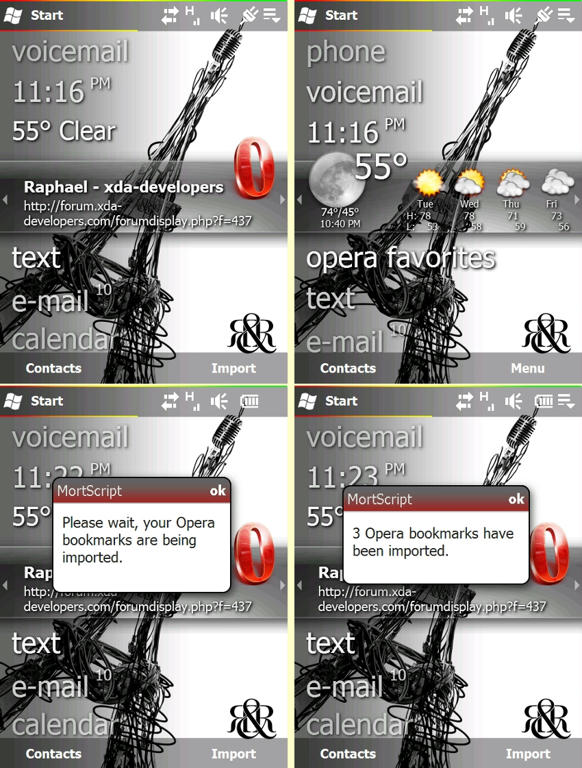 for qvga Add these layouts to your Titanium_240x320.cpr and Titanium_320x240.cpr; Titanium_240x320.cpr Code<!-- Opera layout templates -->
<Layer ID="OperaExpanded" Visible="False" Width="240" Height="82" Clip="False">
<Layer ID="Page" Clip="False">
<!-- Large icon in upper right -->
<Image ID="Icon" Left="188" Top="-13" Width="43" Height="57" ScaleStyle="Stretch" />
<Text ID="Name" Left="20" Top="22" Width="170" Height="21" FontFamily="Tahoma" FontSize="10" FontStyle="Bold" Wrap="False" VerticalAlignment="Top" Trimming="EllipsisCharacter">
<TextStage TextOffsetType="TextOffsetDropBottomRight" Color="#00000000" TextOffset="1" BlurFactor="3" Alpha="1.0"/>
<TextStage TextOffsetType="TextOffsetNone" Color="#FFFFFFFF"/>
</Text>
<Text ID="URL" Left="20" Top="40" Width="215" Height="30" FontFamily="Tahoma" FontSize="8" FontStyle="Regular" Wrap="True" VerticalAlignment="Top" Trimming="EllipsisCharacter">
<TextStage TextOffsetType="TextOffsetDropBottomRight" Color="#00000000" TextOffset="1" BlurFactor="3" Alpha="1.0"/>
<TextStage TextOffsetType="TextOffsetNone" Color="#FFFFFFFF"/>
</Text>
</Layer>
</Layer>
<Layer ID="OperaCondensed" Visible="False" Width="240" Height="34">
<Layer ID="Page">
<!-- Condensed Line 1 -->
<Text ID="PluginLabel" Left="10" Top="4" Width="220" Height="34" FontFamily="Tahoma" FontSize="18" FontStyle="Regular" Wrap="False" VerticalAlignment="Top" Trimming="EllipsisCharacter" InnerTextType="Resource" Text="cmhomeres.dll,1025">
<TextStage TextOffsetType="TextOffsetDropBottomRight" Color="#00000000" TextOffset="1" BlurFactor="3" Alpha="1.0"/>
<TextStage TextOffsetType="TextOffsetNone" Color="#FFFFFFFF"/>
</Text>
</Layer>
</Layer>
Code<!-- Opera layout templates -->
<Layer ID="OperaExpanded" Visible="False" Width="320" Height="82" Clip="False">
<Layer ID="Page" Clip="False">
<!-- Large icon in upper right -->
<Image ID="Icon" Left="250" Top="-13" Width="43" Height="57" />
<Text ID="Name" Left="20" Top="22" Width="230" Height="21" FontFamily="Tahoma" FontSize="10" FontStyle="Bold" Wrap="False" VerticalAlignment="Top" Trimming="EllipsisCharacter">
<TextStage TextOffsetType="TextOffsetDropBottomRight" Color="#00000000" TextOffset="1" BlurFactor="3" Alpha="1.0"/>
<TextStage TextOffsetType="TextOffsetNone" Color="#FFFFFFFF"/>
</Text>
<Text ID="URL" Left="20" Top="40" Width="230" Height="30" FontFamily="Tahoma" FontSize="8" FontStyle="Regular" Wrap="True" VerticalAlignment="Top" Trimming="EllipsisCharacter">
<TextStage TextOffsetType="TextOffsetDropBottomRight" Color="#00000000" TextOffset="1" BlurFactor="3" Alpha="1.0"/>
<TextStage TextOffsetType="TextOffsetNone" Color="#FFFFFFFF"/>
</Text>
</Layer>
</Layer>
<Layer ID="OperaCondensed" Visible="False" Width="640" Height="68">
<Layer ID="Page">
<!-- Condensed Line 1 -->
<Text ID="PluginLabel" Left="10" Top="4" Width="220" Height="34" FontFamily="Tahoma" FontSize="18" FontStyle="Regular" Wrap="False" VerticalAlignment="Top" Trimming="EllipsisCharacter" InnerTextType="Resource" Text="cmhomeres.dll,1025">
<TextStage TextOffsetType="TextOffsetDropBottomRight" Color="#00000000" TextOffset="1" BlurFactor="3" Alpha="1.0"/>
<TextStage TextOffsetType="TextOffsetNone" Color="#FFFFFFFF"/>
</Text>
</Layer>
</Layer>
original thread Codehttp://forum.xda-developers.com/showthread.php?t=481379 Download Now
Show Your Support
|
|||||||||||||||||||||||||

 About Supporter


 Uses Cab Files
  No support by the author.
| The Following 9 Users Say Thank You to havox22 For This Useful Post: | ||
| Comments |
|
#2
 04-14-2009, 05:18 AM
|
||||
|
||||
 Re: Titanium Opera65 panel
Hi nice find thanks i am using this
grtz weesje moderator@Wckediden 
|



|
#3
04-14-2009, 06:05 PM
|
||||
|
||||
|
Re: Titanium Opera65 panel
what theme is that and do we have.....from the picture I can't tell if its swcked shell or what but it looks very nice. Never mind its wm 6.5 I have to find that
|

|
#4
04-14-2009, 06:17 PM
|
||||
|
||||
Re: Titanium Opera65 panel
“ Originally Posted by weesje
|

|
#5
04-14-2009, 07:34 PM
|
||||
|
||||
|
Re: Titanium Opera65 panel
can somebody up date the first post with this plus the updated cab...thanks
for qvga Add these layouts to your Titanium_240x320.cpr and Titanium_320x240.cpr; Titanium_240x320.cpr Code<!-- Opera layout templates -->
<Layer ID="OperaExpanded" Visible="False" Width="240" Height="82" Clip="False">
<Layer ID="Page" Clip="False">
<!-- Large icon in upper right -->
<Image ID="Icon" Left="188" Top="-13" Width="43" Height="57" ScaleStyle="Stretch" />
<Text ID="Name" Left="20" Top="22" Width="170" Height="21" FontFamily="Tahoma" FontSize="10" FontStyle="Bold" Wrap="False" VerticalAlignment="Top" Trimming="EllipsisCharacter">
<TextStage TextOffsetType="TextOffsetDropBottomRight" Color="#00000000" TextOffset="1" BlurFactor="3" Alpha="1.0"/>
<TextStage TextOffsetType="TextOffsetNone" Color="#FFFFFFFF"/>
</Text>
<Text ID="URL" Left="20" Top="40" Width="215" Height="30" FontFamily="Tahoma" FontSize="8" FontStyle="Regular" Wrap="True" VerticalAlignment="Top" Trimming="EllipsisCharacter">
<TextStage TextOffsetType="TextOffsetDropBottomRight" Color="#00000000" TextOffset="1" BlurFactor="3" Alpha="1.0"/>
<TextStage TextOffsetType="TextOffsetNone" Color="#FFFFFFFF"/>
</Text>
</Layer>
</Layer>
<Layer ID="OperaCondensed" Visible="False" Width="240" Height="34">
<Layer ID="Page">
<!-- Condensed Line 1 -->
<Text ID="PluginLabel" Left="10" Top="4" Width="220" Height="34" FontFamily="Tahoma" FontSize="18" FontStyle="Regular" Wrap="False" VerticalAlignment="Top" Trimming="EllipsisCharacter" InnerTextType="Resource" Text="cmhomeres.dll,1025">
<TextStage TextOffsetType="TextOffsetDropBottomRight" Color="#00000000" TextOffset="1" BlurFactor="3" Alpha="1.0"/>
<TextStage TextOffsetType="TextOffsetNone" Color="#FFFFFFFF"/>
</Text>
</Layer>
</Layer>
Code<!-- Opera layout templates -->
<Layer ID="OperaExpanded" Visible="False" Width="320" Height="82" Clip="False">
<Layer ID="Page" Clip="False">
<!-- Large icon in upper right -->
<Image ID="Icon" Left="250" Top="-13" Width="43" Height="57" />
<Text ID="Name" Left="20" Top="22" Width="230" Height="21" FontFamily="Tahoma" FontSize="10" FontStyle="Bold" Wrap="False" VerticalAlignment="Top" Trimming="EllipsisCharacter">
<TextStage TextOffsetType="TextOffsetDropBottomRight" Color="#00000000" TextOffset="1" BlurFactor="3" Alpha="1.0"/>
<TextStage TextOffsetType="TextOffsetNone" Color="#FFFFFFFF"/>
</Text>
<Text ID="URL" Left="20" Top="40" Width="230" Height="30" FontFamily="Tahoma" FontSize="8" FontStyle="Regular" Wrap="True" VerticalAlignment="Top" Trimming="EllipsisCharacter">
<TextStage TextOffsetType="TextOffsetDropBottomRight" Color="#00000000" TextOffset="1" BlurFactor="3" Alpha="1.0"/>
<TextStage TextOffsetType="TextOffsetNone" Color="#FFFFFFFF"/>
</Text>
</Layer>
</Layer>
<Layer ID="OperaCondensed" Visible="False" Width="640" Height="68">
<Layer ID="Page">
<!-- Condensed Line 1 -->
<Text ID="PluginLabel" Left="10" Top="4" Width="220" Height="34" FontFamily="Tahoma" FontSize="18" FontStyle="Regular" Wrap="False" VerticalAlignment="Top" Trimming="EllipsisCharacter" InnerTextType="Resource" Text="cmhomeres.dll,1025">
<TextStage TextOffsetType="TextOffsetDropBottomRight" Color="#00000000" TextOffset="1" BlurFactor="3" Alpha="1.0"/>
<TextStage TextOffsetType="TextOffsetNone" Color="#FFFFFFFF"/>
</Text>
</Layer>
</Layer>
|
|
#6
04-14-2009, 07:44 PM
|
||||
|
||||
|
Re: Titanium Opera65 panel
oke bro done addet to the first posted
GRTZ WEESJE MODERATOR@Wckediden
|
|
#7
04-16-2009, 11:42 PM
|
||||
|
||||
|
Re: Titanium Opera65 panel
can somebody delete the Showaco Opera6.5.cab & keep Showaco Operav.2.cab attachments its seems like most people are downloading the old 1...thanks
|
|
#8
04-17-2009, 12:04 AM
|
||||
|
||||
Re: Titanium Opera65 panel
“ Originally Posted by havox22
|
|
#9
04-17-2009, 03:59 AM
|
||||
|
||||
Re: Titanium Opera65 panel
“ Originally Posted by crazaytalent
|
|
#10
04-17-2009, 05:29 AM
|
||||
|
||||
Re: Titanium Opera65 panel
“ Originally Posted by havox22
|
|
#11
04-17-2009, 05:39 AM
|
||||
|
||||
|
Re: Titanium Opera65 panel
it installed correctly for me make sure u have mortscript installed already..if u already got titanium weather installed then u got it...after u install it go to HKLM\Software\Microsoft\CHome\ExtensibilityXML in the registry and add Opera; to it i put it in the front like <plugins order="Opera;Cmyphotos;
im running JDs latest rom if that makes a difference
|
  |
| Tags |
| opera65, panel, titanium |

«
Previous Thread
|
Next Thread
»
| Currently Active Users Viewing This Thread: 1 (0 members and 1 guests) | |
| Thread Tools | |
|
|

|
Similar Threads
|
||||
| Thread | Thread Starter | Forum | Replies | Last Post |
| [UPDATES] [SKN] WM65 Titanium: Titanium Bufed 04 Big Album Fix 06/07 | jr5416 | QVGA Titanium / 6.5 Themes | 7 | 07-24-2009 11:02 AM |
| [UPDATES] [SKIN] [Titanium] [QVGA] [20june] TitaniumRIGHT 05 - Titanium as NEVER see | jr5416 | QVGA Titanium / 6.5 Themes | 1 | 06-19-2009 08:30 PM |
| Titanium System Panel QVGA [Update 6/18/09] | jr5416 | Mobile Locker | 5 | 06-19-2009 02:44 AM |
| Weather Panel 2.51 Fixing Update Problems | D/\SH | WM And PPC Applications | 4 | 02-10-2008 08:57 PM |
All times are GMT -4. The time now is 05:13 AM.