 |



|
#1
 08-04-2009, 05:56 AM
|
||||
|
||||
|
Installing Hebrew on HTC Hero (Android 15
hi guys i take no credit for this found here Codehttp://myandroidblog.wordpress.com/2009/08/03/htc-hero-root-access/ HTC Hero Root access By fakker1 1. Download: 1. Codehttp://developer.android.com/sdk/download.html?v=android-sdk-windows-1.5_r3.zip Code. http://rapidshare.de/files/47972320/orange-htc-hero-uk-boot.img-28-july-2009.zip.html 1. Connect device to computer using USB cable. 2. Mount the SD card from the HTC Alerts Menu (Drag from the top of the screen). 3. Install the sync application from the newly discovered drive in Windows. 3. Extract the two zip files into some folder (separate folders for each zip). 4. Go to the Android SDK folder and open the tools folder. 5. Copy the two files from the boot image zip (1.b) into the tools folder: 1. boot.img.insecure 2. boot.img 6. Shutdown the phone. 7. Press and hold the back key and power on the phone. This is get you into the fastboot screen (the white screen with three androids at the bottom). 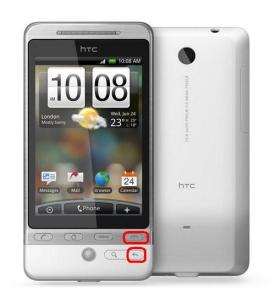 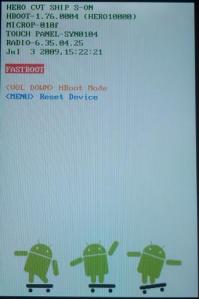 8. Connect the phone to the USB cable if its unplugged. 9. On Windows, open cmd.exe (Start -> Run -> cmd.exe -> Enter): 1. Change the directory to the tools directory youve created earlier. 2. Run fastboot.exe boot boot.img.insecure from within the tools directory. Output: downloading 'boot.img'... OKAY booting... OKAY 3. Now your device will start from the given image with root access. 10. Gain root access: 1. In the phones alerts menu, click HTC Sync. This will popup the HTC Sync tool in Windows. Ignore it! 2. In cmd type: adb.exe shell Output: # 3. From the prompt you got (#) run the following command to mount the phones file system in RW mode: mount -o rw,remount -t yaffs2 /dev/block/mtdblock3 /system 11. Add su command to your Phone 1. Run the the following commands in the shell (#) Run each command separately (dont just copy-paste all the lines!): 1. cat /system/bin/sh > /system/bin/su 2. chmod 4755 /system/bin/su 2. 12. Reboot the phone by typing reboot in the shell (#). 13. The phone will restart and load the original Android ROM. 14. Enjoy the your Rooted Device Thanks To : adq from the xda forum for the rooting info. GRTZ CYBER WEESJE ADMINISTRATOR@Wckediden HIT THANKS ON THE WAY OUT Last edited by CYBER WEESJE; 10-15-2009 at 05:53 PM. 
|





|
#2
10-15-2009, 05:54 PM
|
||||
|
||||
 Re Installing Hebrew on HTC Hero (Android 15
bump bump added youtube vid
GRTZ CYBER WEESJE ADMINISTRATOR@Wckediden
|
|
#3
10-15-2009, 06:32 PM
|
||||
|
||||
|
Re: Installing Hebrew on HTC Hero (Android 15
thanks buddy but it don't work for the sprint hero yet,,i'll be looking for this
|




|
#4
10-15-2009, 06:36 PM
|
||||
|
||||
|
Re Installing Hebrew on HTC Hero (Android 15
Very nice post bro will be helpfull to those Hero users. The vid made it 10x easier too haha
|
  |
| Tags |
| android, hebrew, hero, htc, installing |

«
Previous Thread
|
Next Thread
»
| Currently Active Users Viewing This Thread: 1 (0 members and 1 guests) | |
| Thread Tools | Search this Thread |


|
|

 Similar Threads
|
||||
| Thread | Thread Starter | Forum | Replies | Last Post |
| [NEWS] HTC Hero CDMA Review - HTC Hero, CDMA (S | D/\SH | Society Cell Talk | 0 | 10-16-2009 10:20 PM |
| [RELEASE] THEME] iSkin Hero [WIP] ICE BLUE HERO NOW AVAILABLE | CYBER WEESJE | Android Themes/Wallpapers | 0 | 08-18-2009 11:35 AM |
| [RELEASE] htc hero skin 11 ANDROID HERO BOOTGIF | CYBER WEESJE | Android Themes/Wallpapers | 3 | 07-25-2009 11:16 PM |
| EYRON Hebrew DIAMOND | D/\SH | WM And PPC Applications | 0 | 09-28-2008 05:03 AM |
| BEIKS Talking English Hebrew Phrase Book v6.0.1056 | D/\SH | WM And PPC Applications | 6 | 05-03-2008 07:48 PM |
All times are GMT -4. The time now is 10:24 AM.