 |



 Omnipresence, The best Windows Mobile Remote Desktop Replacement Details »»
|
||||||||||||||||||||||
|
Omnipresence, The best Windows Mobile Remote Desktop Replacement

Supporter Last Online: Nov 2009 


Omnipresence, The best Windows Mobile Remote Desktop Replacement
Only seems to work with HTC TOUCH DIAMOND AND TOUCH PRO... A software engineer friend of mine has been working on a new Remote Desktop/Device type application that is built with mobile devices in mind. The code has been written such that it works on any platform that supports .NET. All the platform has to do is know how to scrape a screen shot, send a mouse click, and send a key click. This made the Windows and Windows Mobile clients and servers trivial to implement. He has leveraged some of the cool sensors on the Diamond obviously: changing the device's orientation rotates the target screen to match. And the Nav wheel is used as a zooming function, similar to Opera! Note/Update: This client does NOT work with Remote Desktop. It is a complete replacement for both the client and the server. It uses a completely different protocol, is a platform independent application (well, theoretically it is since it is written in .NET), and very mobile device friendly. The current RDP Windows Mobile client has two problems: The WM6 RDP client is very mobile device unfriendly. You can't zoom, finger pan, and you have no idea where you clicked. On many devices, it does not even work. Microsoft supposedly has no plans to maintain it. Logging in via Remote Desktop locks your screen. I want to be able to use my phone as a true "remote". For example, managing songs playing on the computer, doing power point presentations, etc. Locking the screen is not what I want to happen in these scenarios. I did not start writing this with plans to have it be an administration tool in mind. Internally, I've actually been using Omnipresence to connect to an Omnipresence server, and then use Remote Desktop on the server to access any other machine that does not have Omnipresence installed. Screen shots for your viewing pleasure: 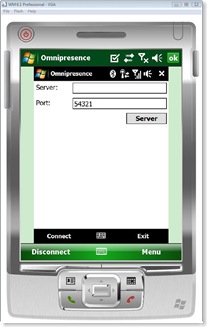 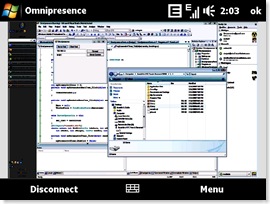 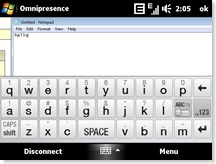  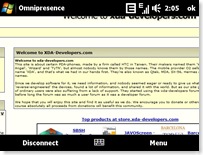 Ok, this is a very early release just for people to check it out. I've mostly been playing around with compression algorithms and investigation of VNC at the moment, so the UI hasn't changed much from the original screen shots. There's a lot of little issues I know about, the primary ones being the inability to unlock a locked machine and being able to click/drag. Anyway, feel free to leave feedback. Installation: Verify you have .NET 3.5 installed on your computer. Verify you have .NET CF 3.5 installed on your device. Unzip the ZIP file into a directory. Copy the CAB from the ZIP onto your device and install. Run Omnipresence.exe on your computer. Start the server. Run Omnipresence from your device. Type in your IP address/host and hit connect. Simple instructions: Double tap to zoom in and out Use the HTC Diamond Nav Wheel to smoothly zoom in and out. Drag your finger along the screen to pan. Click and hold to send a right click to the remote machine. You can enter full screen via the menu. You can leave full screen by pressing the center rocker/nav key. I recommend downloading GSen to support screen rotation (I removed it from my app, why do it when someone else does it better?) Have fun! Note: This release only has the Windows Mobile Client and the Windows Server. http://rapidshare.com/files/14439743...sence.zip.html Show Your Support
|
||||||||||||||||||||||

 About Supporter
 Supported
 | The Following User Says Thank You to ICEM/\N For This Useful Post: | ||
|
huss30 (01-20-2009)
| ||
  |
| Tags |
| desktop, mobile, omnipresence, remote, replacement, windows |

«
Previous Thread
|
Next Thread
»
| Currently Active Users Viewing This Thread: 1 (0 members and 1 guests) | |
| Thread Tools | |
|
|

|
Similar Threads
|
||||
| Thread | Thread Starter | Forum | Replies | Last Post |
| Microsoft fixes Remote Desktop issues caused by Windows Server update | phillynews215 | Web Host News | 0 | 10-08-2024 03:30 PM |
| Diamond Remote Desktop Mobile (Diamond ONLY) | BiG JeW | WM And PPC Applications | 11 | 06-16-2009 01:07 PM |
| [NEW] Remote Touch Gamma v10: The quickest remote touch app for WiMo | CYBER WEESJE | WM And PPC Applications | 3 | 12-17-2008 05:08 AM |
| [BETA] Remote Touch: realy kewl and advanced PC remote | legend2700 | WM And PPC Applications | 7 | 12-16-2008 07:33 PM |
| WM6_RDP (Mobile Remote Desktop Client) | D/\SH | WM And PPC Applications | 0 | 10-05-2007 03:57 PM |
All times are GMT -4. The time now is 08:20 AM.