 |



|
#1
 07-05-2024, 10:39 PM
|
||||
|
||||
 Android 15s Contact Keys is a step towards Apple-like protection from cybe
 Credit: Robert Triggs / Android Authority
Android 15s first beta introduced a new E2eeContactKeysManager API, which is said to facilitate end-to-end encryption (E2EE) in Android apps by providing an “OS-level API for the storage of cryptographic public keys.†Google notes that the API is designed to integrate with the “platform contacts app†to give users a “centralized way to manage and verify their contacts public keys.†We now have some more info on how the user-facing elements will work for Contact Keys, potentially building up Android as a better competitor against Apple for sophisticated cyberattacks. While Android 15 introduced the API, Google Play Services will handle the functionality related to Contact Keys. Weve spotted new activities and strings in the latest Google Play Services beta that give us a clue about how the feature will work. Starting off with the activities, weve spotted three of them within Play Services: one for onboarding, one for showing the QR code, and one for scanning the QR code. 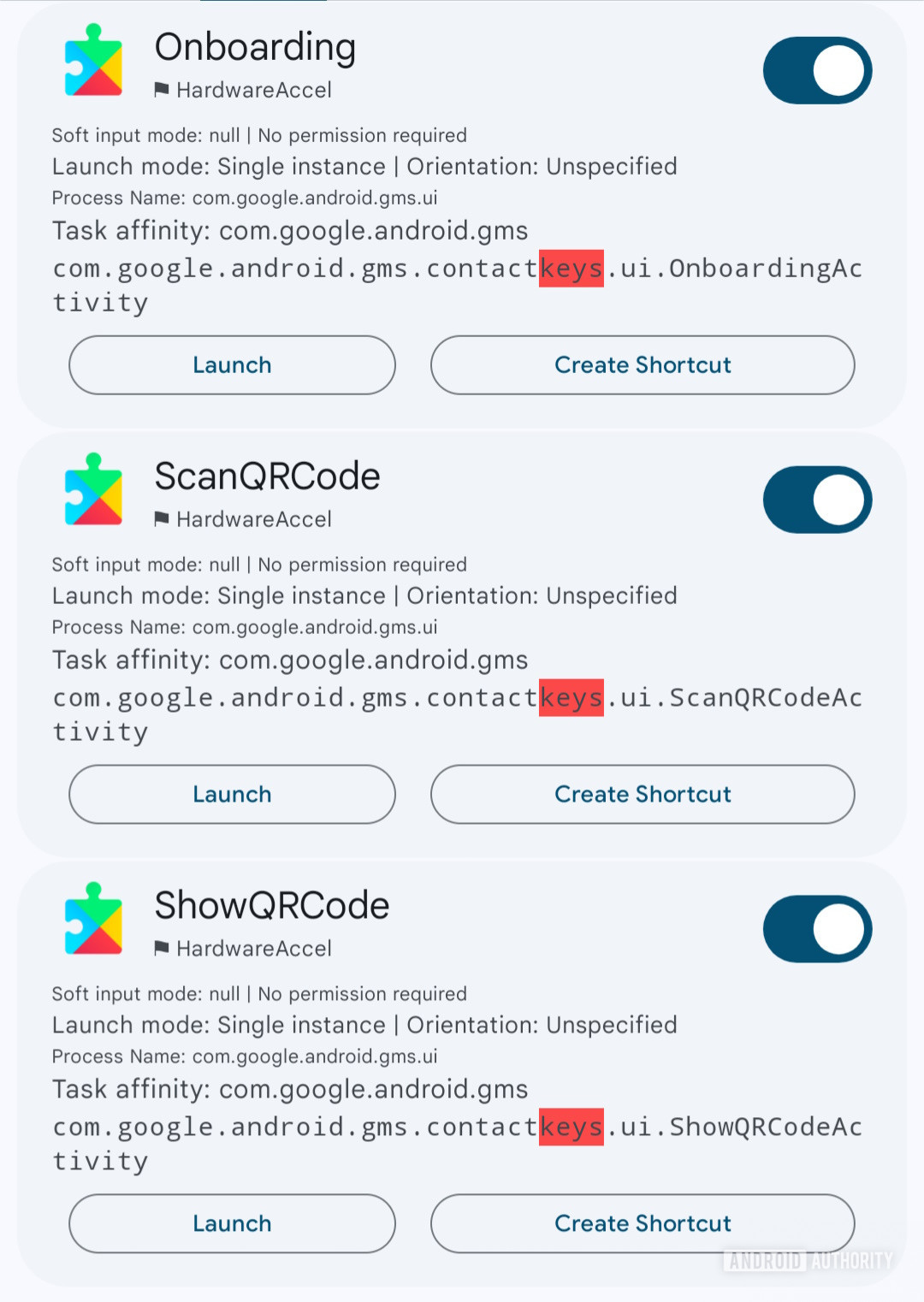 Next, we found plenty of strings, which help us piece together how the feature could work: Scan codeShow codeScan the QR code on this contact's phone. This will confirm encryption between your phones for all end-to-end encrypted apps. To do this, they'll need to open the Google Contacts app > Contacts settings > Your info.Confirm end-to-end encryptionNo keys to verify.Show numbersAsk this contact to scan your code here, which you can also access from Contacts Settings > Your Info. You can also compare the app specific numbers instead.Error starting key verification, no contact specifiedAs we can learn from the strings, the Contact Keys feature will rely heavily on the Google Contacts app for its UX. Users who want to confirm that all their E2E apps are actually encrypted can scan the QR code present on the other persons Google Contacts app. Alternatively, the strings hint that you could also compare the app-specific numbers instead to reassure yourself about the encryption status. Apple has a similar feature on iOS called Contact Key Verification, which was added in iOS 17.2. Contact Key Verification lets you receive automatic alerts that help verify that you are communicating only with the people you intend to communicate with. By verifying the encryption status, you can reassure yourself that you are not being targeted by any sophisticated cyber attack. 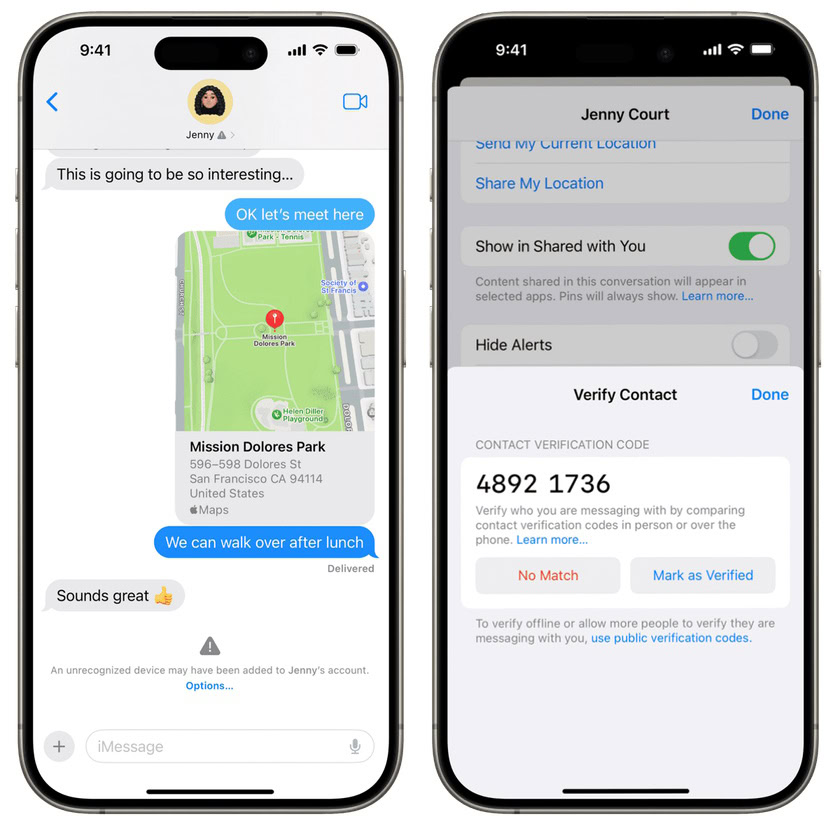 Contact Key Verification on iOS 17.2 Credit: Apple If you want to learn more, Apples security blog post goes into more detail about Contact Key Verification. We expect Googles Contact Keys to be on similar lines, albeit at an earlier stage of progress. The strings dont indicate any automatic messages being sent out like you can with iMessage Contact Key Verification. This can change for the better in the future, but its still a good step forward in its current form. More... 
|





  |
«
Previous Thread
|
Next Thread
»
| Currently Active Users Viewing This Thread: 1 (0 members and 1 guests) | |
| Thread Tools | |


|
|

 Similar Threads
|
||||
| Thread | Thread Starter | Forum | Replies | Last Post |
| Google Messages takes a step towards secure messaging across apps and platf | phillynews215 | Digital Scoop | 0 | 01-09-2025 02:56 AM |
| [NEWS] Samsung takes critical step towards strengthening its future | phillynews215 | Just About Digital Community | 0 | 12-25-2024 03:33 AM |
| Pixel 8a might miss out on Android 15s audio sharing feature | phillynews215 | Bulletin News | 0 | 07-02-2024 09:11 PM |
| You can finally use Circle to Search with Android 15s action key | phillynews215 | Bulletin News | 0 | 06-18-2024 09:36 PM |
| Backgrounds Soft Keys and Hard Keys | MercTheCool | HTC Touch Pro Questions | 15 | 02-10-2009 02:58 AM |
All times are GMT -4. The time now is 10:33 AM.