 |



 Spb Mobile Shell 452 SKINs Fast Switch customization FOR SPB 35 20/11 Details »»
|
|||||||||||||||||||||||||||
|
Spb Mobile Shell 452 SKINs Fast Switch customization FOR SPB 35 20/11

Supporter Last Online: Nov 2009 

[Skin] Swcked Mobile Shell 4.12 SKINs - Fast Switch and customization --------------------------------------------------------------------------------
Don't loose time with SOFT RESET, get the NEW SKIN COLLECTION with AUTO-SWITCH feature. HERE IS THE REVOLUTION With this tool you can customize "on the fly" (without soft reset) the look of your mobile phone launcher application, choosing from different basic skins and a from several background alternative images. Extra options are available to refine the final aspect: menu launcher buttons, analog and digital clocks, weather icons and more. Here is the LINK: Codehttp://www.imarche.net/omnia/index.php 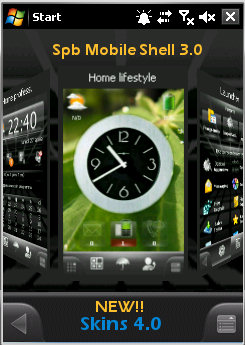 Installation Instructions: Extract the whole .zip file into your storage card and execute the "Install_*****.mscr" script; set the user language. A SOFT RESET is required to active the connection status icon refresh (you can also run the script "ScanStatus.mscr"). Note: If you have installed the previous version 3.0 and it works well, install the update file 3.1; otherwise run the "UnInstall.mscr" script (or remove manually the "SwckedMobileShellSkins" folder). ALL FILES WILL BE REMOVED, PLEASE SAVE FIRST THE ADDITIONAL COMPONENTS Update v.4.1.1 Installation Instructions: Extract the .zip file into the device memory where you have installed the previous release 4.1 or 4.1.1 (for example "\My Storage"), overwriting existing files. Execute the script named "Install_*****.mscr" using "File Explorer" from folder ..\SwckedMobileShellSkins\Scripts. DON'T RUN THE UNINSTALL.mscr SCRIPT!! , See the release history for the update details. Download Instructions: CodeChange SKIN v.4.11 QVGA http://depositfiles.com/files/6817o21r1 Change SKIN v.4.11 VGA http://depositfiles.com/files/7oyoyi9s1 Change SKIN v.4.11 WQVGA http://depositfiles.com/files/q7hiaxyty Change SKIN v.4.11 WVGA http://depositfiles.com/files/6osukhha5 Change SKIN v.4.11 Square 320*320 http://depositfiles.com/files/393fymwgt Change SKIN v.4.11 Square 240*240 http://depositfiles.com/files/bonrhdcwj Mirror: Codev.4.11 QVGA http://s3.filesdump.com/file/9359ee704005/15983/SwckedMobileShell3.0-QVGA-Skins_Release4.1.2_Update.zip.html v.4.11 VGA http://s3.filesdump.com/file/843751ccfbc3/15983/SwckedMobileShell3.0-VGA-Skins_Release4.1.2_Update.zip.html v.4.11 WQVGA http://s3.filesdump.com/file/4634e8b700cc/15983/SwckedMobileShell3.0-WQVGA-Skins_Release4.1.2_Update.zip.html v.4.11 WVGA http://s3.filesdump.com/file/666ed67b57eb/15983/SwckedMobileShell3.0-WVGA-Skins_Release4.1.2_Update.zip.html v.4.11 Square 320*320 http://s3.filesdump.com/file/4949ad3e9cbb/15983/SwckedMobileShell3.0-SQ320-Skins_Release4.1.2_Update.zip.html v.4.11 Square 240*240 http://s3.filesdump.com/file/d5a4379ca0b2/15983/SwckedMobileShell3.0-SQ240-Skins_Release4.1.2_Update.zip.html 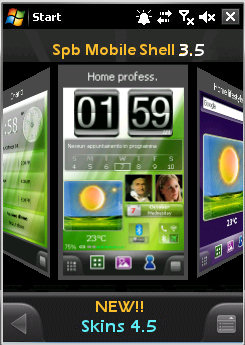  NEW RELEAS ADDED CW 20/11 452 Download Now
Screenshots
Show Your Support
|
|||||||||||||||||||||||||||

 About Supporter
 Uses Cab Files
  External Content
 | The Following 55 Users Say Thank You to scott8813 For This Useful Post: | ||
| Comments |
|
#2
 02-06-2009, 12:28 PM
|
||||
|
||||
 Re: [Skin] Spb Mobile Shell 21 SKINs Fast Switch and customization
man this app is saweet! if you're usin ms then you gotta grab this! great find bro

|


|
#3
02-06-2009, 06:36 PM
|
||||
|
||||
Re: [Skin] Spb Mobile Shell 21 SKINs Fast Switch and customization
“ Originally Posted by Sh0wNuF
|


|
#4
02-15-2009, 01:06 PM
|
||||
|
||||
|
Re: [Skin] Spb Mobile Shell 21 SKINs Fast Switch and customization
i agree whit the rest this is a realy good app i realy like it much thanks scott8813 realy good find
GRTZ WEESJE MODERATOR@Wckediden
|
|
#5
02-27-2009, 11:05 AM
|
||||
|
||||
|
Re: [Skin] Spb Mobile Shell 21 SKINs Fast Switch and customization
noob question...
when i click on the install.****. script it ask what program to use to open it...
|

|
#6
02-27-2009, 11:10 AM
|
||||
|
||||
Re: [Skin] Spb Mobile Shell 21 SKINs Fast Switch and customization
“ Originally Posted by anomoly
|
|
#7
02-27-2009, 12:21 PM
|
||||
|
||||
Re: [Skin] Spb Mobile Shell 21 SKINs Fast Switch and customization
“ Originally Posted by weesje
|
|
#8
02-27-2009, 12:25 PM
|
||||
|
||||
Re: [Skin] Spb Mobile Shell 21 SKINs Fast Switch and customization
“ Originally Posted by anomoly
|
|
#9
02-27-2009, 12:41 PM
|
||||
|
||||
|
Re: [Skin] Spb Mobile Shell 21 SKINs Fast Switch and customization
right after i wrote that last reply, i searched through some forums and found out exactly what you just told me..
had to double click mortscript, once that was done then i could follow the instructions, was easy after that - thanx for the quick reply - Great program!
|
|
#10
03-12-2009, 12:21 AM
|
||||
|
||||
|
Re: [Skin] Spb Mobile Shell 21 SKINs Fast Switch and customization
hey im new to this and reallyhave no idea how to put this software on my phone i have the samsung omnia. do you think you could help me. im pretty much in the dark about all this i have no idea i seriously need like an idiots guide to doing this!
|
|
#11
03-12-2009, 12:29 AM
|
||||
|
||||
Re: [Skin] Spb Mobile Shell 21 SKINs Fast Switch and customization
“ Originally Posted by edjr905
|
|
#12
03-14-2009, 01:13 PM
|
||||
|
||||
|
Re: [Skin] Spb Mobile Shell 21 SKINs Fast Switch and customization
Hi bro theres new releas out here you go
grtz weesje moderator@Wckediden
|
|
#13
03-14-2009, 04:05 PM
|
||||
|
||||
Re: [Skin] Spb Mobile Shell 21 SKINs Fast Switch and customization
“ Originally Posted by weesje
|
|
#14
03-14-2009, 04:15 PM
|
||||
|
||||
Re: [Skin] Spb Mobile Shell 21 SKINs Fast Switch and customization
“ Originally Posted by D/\SH
|
|
#15
03-15-2009, 06:39 PM
|
||||
|
||||
|
Re: [Skin] Spb Mobile Shell 21 SKINs Fast Switch and customization
i have 2.1.4. and when i download the vga and when it finish's downloading it wont let me open the script to do the skins/themes.... what am i doing wrong or is this not the right one i need?
|
|
#16
03-15-2009, 07:13 PM
|
||||
|
||||
Re: [Skin] Spb Mobile Shell 21 SKINs Fast Switch and customization
“ Originally Posted by DJCaSpER
|
|
#17
03-17-2009, 06:35 PM
|
||||
|
||||
|
Re: [Skin] Spb Mobile Shell 21 SKINs Fast Switch and customization
ok i have done that and this is not my first theme that i have used. i have been having problems with these themes sense i flashed.
|
|
#18
03-17-2009, 06:52 PM
|
||||
|
||||
Re: [Skin] Spb Mobile Shell 21 SKINs Fast Switch and customization
“ Originally Posted by DJCaSpER
|
|
#19
03-18-2009, 12:08 AM
|
||||
|
||||
|
Re: [Skin] Spb Mobile Shell 21 SKINs Fast Switch and customization
ok before i flashed i was using this theme. after i flashed my touchpro when i tired to download it again it was saying file could not be found or files are missing, i did read the read me file and it does the same thing, thanks for the help though. i though maybe u would tell me or anyone would tell me to do something that i havent done yet.
hey dash, kaos's take 2 hybrid for touch pro do u know when thats going to come out? because i ask here is because of the themes because im having problems and witch i have stated im having more but those problems are were those need to be.
|
|
#20
03-18-2009, 05:19 AM
|
||||
|
||||
Re: [Skin] Spb Mobile Shell 21 SKINs Fast Switch and customization
“ Originally Posted by DJCaSpER
|
|
#21
03-18-2009, 07:08 PM
|
||||
|
||||
Re: [Skin] Spb Mobile Shell 21 SKINs Fast Switch and customization
“ Originally Posted by DJCaSpER
|
|
#22
03-25-2009, 09:22 AM
|
||||
|
||||
|
Re: [Skin] Spb Mobile Shell 21 SKINs Fast Switch and customization
hey i screwed the pooch on this one, i downloaded the vga instead of qvga! but now i cant delete the vga it says unable to delete in violation without hard reset how can i get rid of the vga. by the way i am using alltel touch. plus i already downloaded the qvga as well. thanks dudes
|
|
#23
03-25-2009, 09:32 AM
|
||||
|
||||
Re: [Skin] Spb Mobile Shell 21 SKINs Fast Switch and customization
“ Originally Posted by suka4luv
|
|
#24
04-30-2009, 01:33 PM
|
||||
|
||||
|
Re: [Skin] Spb Mobile Shell 21 SKINs Fast Switch and customization FOR SPB
Bump bump and what a bump new releas works whit swcked 3 themes qvga wqvga no hit that thanks button
grtz weesje moderator@Wckediden
|
|
#25
04-30-2009, 01:43 PM
|
||||
|
||||
Re: [Skin] Spb Mobile Shell 21 SKINs Fast Switch and customization FOR SPB
“ Originally Posted by weesje
|
|
#26
04-30-2009, 01:49 PM
|
||||
|
||||
|
Re: [Skin] Spb Mobile Shell 21 SKINs Fast Switch and customization FOR SPB
i did try this a couple of day ago and didnt really like it. It didnt seem to work as smooth as it did for ms2. thats just my take on it. thanks for the release
|
|
#27
04-30-2009, 01:53 PM
|
||||
|
||||
Re: [Skin] Spb Mobile Shell 21 SKINs Fast Switch and customization FOR SPB
“ Originally Posted by crazaytalent
|
|
#28
04-30-2009, 01:55 PM
|
||||
|
||||
Re: [Skin] Spb Mobile Shell 21 SKINs Fast Switch and customization FOR SPB
“ Originally Posted by mikeyd
|
|
#29
05-01-2009, 11:19 PM
|
||||
|
||||
|
Re: [Skin] Spb Mobile Shell 21 SKINs Fast Switch and customization FOR SPB
great m8
They chould made a statue from u for making good posts. grtz :)
|
|
#30
05-02-2009, 05:41 AM
|
||||
|
||||
Re: [Skin] Spb Mobile Shell 21 SKINs Fast Switch and customization FOR SPB
“ Originally Posted by Longfist
|
|
#31
05-02-2009, 05:46 AM
|
||||
|
||||
Re: [Skin] Spb Mobile Shell 21 SKINs Fast Switch and customization FOR SPB
“ Originally Posted by longfist
|
|
#32
05-02-2009, 06:37 AM
|
||||
|
||||
Re: [Skin] Spb Mobile Shell 21 SKINs Fast Switch and customization
“ Originally Posted by suka4luv
|
|
#35
05-03-2009, 10:41 PM
|
||||
|
||||
|
Re: Spb Mobile Shell 30 SKINs Fast Switch customization FOR SPB 3 [March 2]
glad u like it... please press the thanks button and mark as installed if you havent
|
|
#37
05-04-2009, 11:13 AM
|
||||
|
||||
Re: [Skin] Spb Mobile Shell 21 SKINs Fast Switch and customization
“ Originally Posted by edjr905
|
|
#38
05-06-2009, 07:40 PM
|
||||
|
||||
|
Re: Spb Mobile Shell 41 SKINs Fast Switch customization FOR SPB 3 07/05
Bump bump new releas addet 4.1 to the first posted
grtz weesje moderator@Wckediden
|
|
#39
05-16-2009, 12:05 PM
|
||||
|
||||
|
Re: Spb Mobile Shell 412 SKINs Fast Switch customization FOR SPB 30 [MAY 16
Bumped yet again
updates up.........come and get it
|
|
#40
05-16-2009, 12:13 PM
|
||||
|
||||
Re: Spb Mobile Shell 412 SKINs Fast Switch customization FOR SPB 30 [MAY 16
“ Originally Posted by scott8813
|
|
#41
05-16-2009, 12:46 PM
|
||||
|
||||
Re: Spb Mobile Shell 412 SKINs Fast Switch customization FOR SPB 30 [MAY 16
“ Originally Posted by weesje
|
|
#42
05-16-2009, 12:48 PM
|
||||
|
||||
Re: Spb Mobile Shell 412 SKINs Fast Switch customization FOR SPB 30 [MAY 16
“ Originally Posted by D/\SH
|
|
#43
05-20-2009, 06:04 PM
|
||||
|
||||
|
Re: Spb Mobile Shell 412 SKINs Fast Switch customization FOR SPB 30 [MAY 16
Anybody have serial keys for the weather??
|
|
#44
05-20-2009, 06:16 PM
|
||||
|
||||
Re: Spb Mobile Shell 412 SKINs Fast Switch customization FOR SPB 30 [MAY 16
“ Originally Posted by Slepe43
|
|
#45
05-24-2009, 07:44 PM
|
||||
|
||||
|
Re: Spb Mobile Shell 412 SKINs Fast Switch customization FOR SPB 30 [MAY 16
So need a little help. Downloaded and did as instructed in the readme, installed mortscript, installed vga, selected english, yes to install all themes, then installed the vista theme and selected all my button styles as it walked me through the prompts and chose my clocks, etc, reset device and i just have a black screen? I can asccess everything but it's a black screen and nothing changed. I noticed it said to also install the scanstatus.mortscript, but under scripts where it says "scan status" I click on it and nothing happens and it doesnt look like a mortscript it's just same file format as themes are? I not sure what I missed? Any ideas on wtf I did wrong. I also tried to go in w resco explorer but nothing was any different there either so I'm just stuck right now. All I want is my mobile shell skinned like vista, this seemed to be the way but idk...future thanks guys!
|
|
#46
05-25-2009, 04:45 AM
|
||||
|
||||
Re: Spb Mobile Shell 412 SKINs Fast Switch customization FOR SPB 30 [MAY 16
“ Originally Posted by johnnyeoneal
|
|
#47
05-25-2009, 06:19 PM
|
||||
|
||||
|
Re: Spb Mobile Shell 412 SKINs Fast Switch customization FOR SPB 30 [MAY 16
Ok so I placed the folder into Storage Card. I click install_vga and then i get "cannot find Swcked Mobile Shell Version 3.0: Path=\Storage Card\ SwckedMobileShellSkins Registry=" I know I am doing something wrong but am not sure what at the moment.
|
|
#48
05-25-2009, 06:26 PM
|
||||
|
||||
Re: Spb Mobile Shell 412 SKINs Fast Switch customization FOR SPB 30 [MAY 16
“ Originally Posted by blazingfate
|
|
#49
05-25-2009, 06:28 PM
|
||||
|
||||
Re: Spb Mobile Shell 412 SKINs Fast Switch customization FOR SPB 30 [MAY 16
“ Originally Posted by blazingfate
|
|
#50
05-25-2009, 07:01 PM
|
||||
|
||||
|
Re: Spb Mobile Shell 412 SKINs Fast Switch customization FOR SPB 30 [MAY 16
Yes, I have Swcked 3 installed. Swcked 3 is running just fine.
|
  |
| Tags |
| 07 or 10, 20 or 11, 413, 435, 452, customization, fast, mobile, shell, skins, spb, switch |

«
Previous Thread
|
Next Thread
»
| Currently Active Users Viewing This Thread: 1 (0 members and 1 guests) | |
|
|

|
Similar Threads
|
||||
| Thread | Thread Starter | Forum | Replies | Last Post |
| Nintendo confirms Switch 2 will be backwards compatible with Switch games | phillynews215 | Digital Scoop | 0 | 11-06-2024 01:58 AM |
| [RELEASE] Mobile Shell 3 Toggler - Easily switch between MS3 and Today | CYBER WEESJE | WM And PPC Applications | 3 | 05-06-2009 02:24 PM |
| GSmarted Spb Mobile Shell skins | D/\SH | SPB Mobile Shell Skins | 10 | 11-13-2008 03:59 PM |
| Diamond Spb Mobile Shell skins (freeware) | D/\SH | SPB Mobile Shell Skins | 16 | 10-05-2008 07:09 PM |
All times are GMT -4. The time now is 09:11 AM.