 |



 [APP][27/07/09][PreviewPlugin Titanium english]JMLToday52c-need Skins all Details »»
|
|||||||||||||||||||||||||||
|
[APP][27/07/09][PreviewPlugin Titanium english]JMLToday52c-need Skins all

Supporter Last Online: Nov 2009 

Please read this before:
Here is in accordance with JMHL the Preview for JMLToday in English. I discovered JMLToday some time ago in the web and there it was only for French language, but I liked the style and variability and so I got in contact with JML to translate it to other languages - at first Germany. At first it was only a translation/changing of script - but then we got closer and the changes will be directly implemented in JMLToday - with the goal to have a multilanguage JMLToday. Then I made also a multilang cab and looks for improvements - but the it's not good to have too much cooks - the developer of JMLToday is JMHL -> please visit his Blog: Codehttp://www.jmlacou.com/wpJML/?p=24 With the help and testing of some Users from Diamond-Section we have now a Preview of JMLToday in English Language - full functionality! (Thanks to donsalari, xxmarkosxx) Some questions are already answered there: *Diamond JMLToday5.1-Thread* But the Plugin can work on all resolutions - I made the installer, that it will be installed in every ROM - independent from the language - but the complete development was on the Diamond - and it's to difficult to estimate the other resolutions - especially in Titanium with the different styles. But first have a little look to it (don't mind about foreign languages in Screenshot):   Important and what we need: VGA/WVGA-Users: The Plugin should work by default - you can change the skin, how you like. In the links above you will find much more skins and Icons. But very much Skins have no Landscape support - and also new Skins would be really great! It's not difficult - if you look with CHome into the Vars - you will see, that very much different Skins are easy to make. User with other resolutions like QVGA WQVGA: The Plugin can be installed, but there is no .plg which has your Resolution. So it won't be added to the right .cpr - nothing to see. But you would have the complete .plg-Files in the JMLToday-Directory... and you can add the sections for your resolution and resize the Icons and texts, that it looks nice. Copy complete <layout screenWidth="480" screenHeight="640"> ... </layout> Section and add it with your resolution. With the "Change Skin"-Contextmenu by tapping on the Main-Screen (or by starting "jmltodayskins.mscr" you can always test. The Plugin works very stable - so I don't think you can do something wrong - but nevertheless: JMHL or me can't be made responsible for that what you do Features 5.1 preview: - Digital Clock - Weather for Today and next 5 Days ( you'll find your town with Codehttp://weather.msn.com - Short description of weather _ Battery, Appointments, Bluetooth, Wifi, Alarm-State - Notifications for SMS and Phone (with extended Contextmenu!) - Support of S2U2-UserWeather - Support for Titanium7-Project and "custom" Titanium - what you prefer - no costs - ... much more - you'll see The Program is written in C++ - so minimal Battery-Drain in opposite to 24/7-Mortscripts, complete skinable because everything to change is outside the C++ in Mortscript (but no 24/7 ) Why not Accuweather? In MSN it's a very small size to load (in next version only 1,5 Kb) - and you'll find much more small villages - perhaps yours) Please help us to geht Skins for all Resolutions and for Portrait and Landscape. We hope with the Multi-Language-Release of JMLToday - which will be made by JML - your Skins could be inside. You can also looking forward to: - configurable Clock/Alarm-Path (if U use e.g. G-Alarm, Pocket-Alarm,...) - Interface for Skinners to add more informations, wherever they are (2nd weathercity, more Appointments, Birthdays,... whatever you like) - Analog Clock -... Notes because of questions: - The default Plugin is "JMLToday.plg" - for this file we would need the qvga,... as most urgent - the default.plg is only the hook for ATPluginInstaller - no need to change anything. - Everything with "WM7" inside Skin-Name is for Titanium7-Project - Use CHome-Editor from Showaco to see, what informations can be displayed in JMLToday Thank you for your help - I will send working skins to JML and your Skin could be inside the next Releases - feedback is appreciated that we can see, that a skin is working on other resolutions - also new Ideas are welcome. Thanks to everybody, who will help! Original Link: Codehttp://forum.xda-developers.com/showthread.php?t=538746&page=2  -Here is a trial for JMLtoday all resoulutions: Here is the first trial for JMLToday in ALL RESOLUTIONS - who has VGA or WVGA: Nothing to change - only test for other devices. I attach here the File "JMLToday_Trial_all_resolutions.zip" - but the icons are only estimated - please make a screenshot or help me to change it, if something is on the wrong position. But to install - please stick strictly to following steps: 1. If you had installed jmlToday before - please uninstall it 2. Switch off Titanium 3. Install jmltoday_v51_english_v1.CAB from Post #1 4. Unzip "JMLToday_Trial_all_resolutions.zip" - you will see only one file: "JMLToday.plg" 5. Copy this file to the JMLToday-Directory (overwrite: yes! ) 6. Switch on Titanium and follow the installation message from JMLToday Please feedback if it's work for QVGA,WQVGA,... Here are some images on wvga: 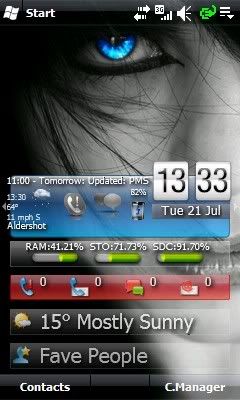 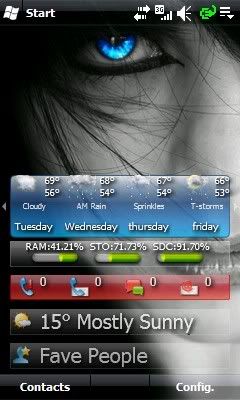 Do not forget to install mortscript!!! [WM6.5] [Titanium plugin] JMLToday V5.2c Changelog Version 5.2c : - Installation by CAB! (thank you very much MichaDiamond) - Settings Multi-lang: fr, en, us, de, it (-> JMLLang.ini - can be translated in every language - please send the translated file in your language by attachment to your posting): Multi-lang: Wetter-Description Multi-lang: Temperature (configurable: low/high, high/low) Multi-lang: Tear-off-Calendar( '.fr' and '.de' just for now) Multi-lang: Context menu Multi-lang: Dateformat Multi-lang: 12 or 24 hour - with AM/PM (no more only military time) - Better handle of changing Skins than previous versions - Analog Clock (-> skin JMLToday_FirstA.plg) (thanks rpereira for pictures) - Skins Portrait/Landscape in this file - the initial Skin in ALL Resoultions (VGA,WVGA,QVGA,WQVGA,...) - All other Skins by default VGA - but in Skin-Thread -> *Skins & AddOns for JMLToday* <- the other skins of resolutions, AddOns, Graphics, will be catalogized. Please help us to get more of all! - Default skin supports all resolutions (-> JMLToday.plg) - Management of a personnel file of events (file Private.txt). The private event is displayed in place of the ephemeris. - Reorganization of context menu. Other Informations : The Program is written in C++ - so minimal Battery-Drain in opposite to 24/7-Mortscripts, complete skinable because everything to change is outside the C++ in Mortscript (but no 24/7 ) Why not Accuweather? In MSN it's a very small size to load (only 1,5 Kb) - and you'll find much more small villages - perhaps yours) A "Tap on screen" from the plugin Page1 launches context menu. A "Tab on Screen" from the plugin Page2 updates Weather/Systems-informations. Here is a link with additional info : Codehttp://forum.xda-developers.com/showthread.php?t=540116 Now in a cab oh yea Download Now
Show Your Support
|
|||||||||||||||||||||||||||

 About Supporter
 Internal Changes
  No support by the author.
| Comments |
|
#2
 07-21-2009, 12:09 PM
|
||||
|
||||
 Re: [APP][09/07/20][PreviewPlugin Titanium english]JMLToday51-need Skins al
Original Link:
Codehttp://forum.xda-developers.com/showthread.php?t=538746&page=2 -Here is a trial for JMLtoday all resoulutions: Here is the first trial for JMLToday in ALL RESOLUTIONS - who has VGA or WVGA: Nothing to change - only test for other devices. I attach here the File "JMLToday_Trial_all_resolutions.zip" - but the icons are only estimated - please make a screenshot or help me to change it, if something is on the wrong position. But to install - please stick strictly to following steps: 1. If you had installed jmlToday before - please uninstall it 2. Switch off Titanium 3. Install jmltoday_v51_english_v1.CAB from Post #1 4. Unzip "JMLToday_Trial_all_resolutions.zip" - you will see only one file: "JMLToday.plg" 5. Copy this file to the JMLToday-Directory (overwrite: yes! ) 6. Switch on Titanium and follow the installation message from JMLToday Please feedback if it's work for QVGA,WQVGA,... Here are some images on wvga: Do not forget to install mortscript!!!
Last edited by CYBER WEESJE; 07-27-2009 at 08:28 AM. 
|



|
#3
07-21-2009, 12:13 PM
|
||||
|
||||
Re: [APP][09/07/20][PreviewPlugin Titanium english]JMLToday51-need Skins al
“ Originally Posted by jr5416
|

|
#4
07-21-2009, 01:55 PM
|
||||
|
||||
|
Re: [APP][21/07/09][PreviewPlugin Titanium english]JMLToday51-need Skins al
Thanks for the Post Jr will have to give this a try and post back.
|
|
#5
07-21-2009, 02:03 PM
|
||||
|
||||
Re: [APP][21/07/09][PreviewPlugin Titanium english]JMLToday51-need Skins al
“ Originally Posted by GokuSS3
|
|
#6
07-21-2009, 02:51 PM
|
||||
|
||||
|
Re: [APP][21/07/09][PreviewPlugin Titanium english]JMLToday51-need Skins al
thanx bro i got caught up with so much other stuff i forgot bout the jml today plugin good find bro
|

|
#7
07-27-2009, 08:15 AM
|
||||
|
||||
|
Re: [APP][21/07/09][PreviewPlugin Titanium english]JMLToday51-need Skins al
[WM6.5] [Titanium plugin] JMLToday V5.2c Changelog Version 5.2c : - Installation by CAB! (thank you very much MichaDiamond) - Settings Multi-lang: fr, en, us, de, it (-> JMLLang.ini - can be translated in every language - please send the translated file in your language by attachment to your posting): Multi-lang: Wetter-Description Multi-lang: Temperature (configurable: low/high, high/low) Multi-lang: Tear-off-Calendar( '.fr' and '.de' just for now) Multi-lang: Context menu Multi-lang: Dateformat Multi-lang: 12 or 24 hour - with AM/PM (no more only military time) - Better handle of changing Skins than previous versions - Analog Clock (-> skin JMLToday_FirstA.plg) (thanks rpereira for pictures) - Skins Portrait/Landscape in this file - the initial Skin in ALL Resoultions (VGA,WVGA,QVGA,WQVGA,...) - All other Skins by default VGA - but in Skin-Thread -> *Skins & AddOns for JMLToday* <- the other skins of resolutions, AddOns, Graphics, will be catalogized. Please help us to get more of all! - Default skin supports all resolutions (-> JMLToday.plg) - Management of a personnel file of events (file Private.txt). The private event is displayed in place of the ephemeris. - Reorganization of context menu. Other Informations : The Program is written in C++ - so minimal Battery-Drain in opposite to 24/7-Mortscripts, complete skinable because everything to change is outside the C++ in Mortscript (but no 24/7 ) Why not Accuweather? In MSN it's a very small size to load (only 1,5 Kb) - and you'll find much more small villages - perhaps yours) A "Tap on screen" from the plugin Page1 launches context menu. A "Tab on Screen" from the plugin Page2 updates Weather/Systems-informations. Here is a link with additional info : Codehttp://forum.xda-developers.com/showthread.php?t=540116 Now in a cab oh yea
Last edited by CYBER WEESJE; 07-27-2009 at 08:26 AM. Reason: cyber
|
|
#8
07-27-2009, 08:29 AM
|
||||
|
||||
|
Re: [APP][21/07/09][PreviewPlugin Titanium english]JMLToday52c-need Skins a
he bro first update whit new releas
GRTZ CYBER WEESJE MODERATOR@Wckediden
|
  |
| Tags |
| apppreviewplugin, englishjmltoday51need, englishjmltoday52cneed, skins, titanium |

«
Previous Thread
|
Next Thread
»
| Currently Active Users Viewing This Thread: 1 (0 members and 1 guests) | |
|
|

|
Similar Threads
|
||||
| Thread | Thread Starter | Forum | Replies | Last Post |
| Free offline translator English-French, French-English. Version 1.2 | D/\SH | Symbian Applications | 0 | 09-23-2007 12:14 PM |
| French-English / English-French Dictionary | D/\SH | Symbian Applications | 0 | 09-23-2007 11:47 AM |
| here your German-English / English-German dictionary for S60 3rd edition... | D/\SH | Symbian Applications | 0 | 09-23-2007 11:46 AM |
| HNHSoft English-English Dictionary v3.0 | D/\SH | WM And PPC Applications | 0 | 08-19-2007 12:06 PM |
All times are GMT -4. The time now is 04:15 PM.