 |



 Modify your Signal Strength, Wifi, EV, and 1x icons! Details »»
|
|||||||||||||||||||||||||||
|
Modify your Signal Strength, Wifi, EV, and 1x icons!

Supporter Last Online: Nov 2009 

<edit>
This thread has changed alot over the pages, so I want to organize everything on this first post. What I've modified so far: -Signal strength bars -Wifi bars -EV icons -1x icons -4G icons All of the above are available in blue, green, orange, pink, red, teal, and yellow. The signal bars are also available in white with a black vertical stripe. Recently Added: MegaMan lifebar type signal indicators  Christmas Tree!  They are all available for download here: Choorp.com - Palm Pre Repository How to use the custom images: (I dont have SFTP setup on my Pre yet, so this tutorial is for doing this via root access. Also, if you want to copy and paste the commands into PuTTY or other program, put the new images on your Pre via USB mode in the main directory) I'm just gonna start off at the point where you have root access. 1. Mount the file system as read/write Codemount -o remount,rw / Codecp /media/internal/red-rssi-1.png /usr/lib/luna/system/luna-systemui/images/rssi-1.png cp /media/internal/red-rssi-2.png /usr/lib/luna/system/luna-systemui/images/rssi-2.png cp /media/internal/red-rssi-3.png /usr/lib/luna/system/luna-systemui/images/rssi-3.png cp /media/internal/red-rssi-4.png /usr/lib/luna/system/luna-systemui/images/rssi-4.png cp /media/internal/red-rssi-5.png /usr/lib/luna/system/luna-systemui/images/rssi-5.png cp /media/internal/red-rssi-error.png /usr/lib/luna/system/luna-systemui/images/rssi-error.png Codestop LunaSysMgr && start LunaSysMgr Codemount -o remount,ro / Reference: When copied to /luna-systemui/images/, the files must be copied to: EV and 4G icons - network-evdo-connected.png and network-evdo-dormant.png 1X icons - network-1x-connected.png and network-1x-dormant.png Signal Strength icons - rssi-1.png (The number being the number of bars) Wifi - wifi-0.png wifi-1.png wifi-2.png wifi-3.png </edit> I was just kinda curious about how people have been customizing their Pre. I haven't done too much yet, just changed the EVDO icons, bars color, battery percentage, carrier text, and a few other little things. Post screen captures of your customized Pres! What have you done so far? :) 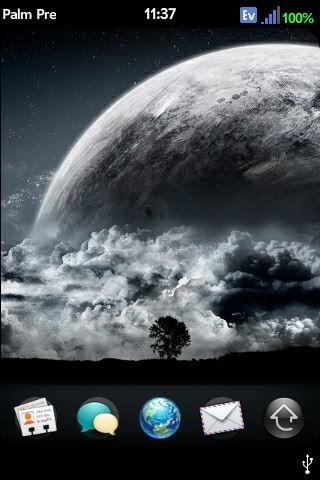 My Dialer: (from Webos-internals.org) 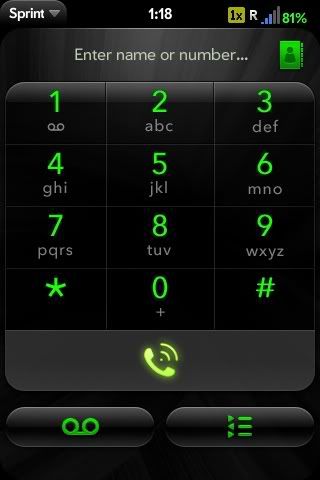 original info was found here: Codehttp://forums.precentral.net/palm-pre-tips-information-resources/195807-modify-your-signal-strength-wifi-ev-1x-icons.html Show Your Support
|
|||||||||||||||||||||||||||

 About Supporter
 Additional Files
  No support by the author.
  |
| Tags |
| icons, modify, signal, strength, wifi |

«
Previous Thread
|
Next Thread
»
| Currently Active Users Viewing This Thread: 1 (0 members and 1 guests) | |
|
|

|
Similar Threads
|
||||
| Thread | Thread Starter | Forum | Replies | Last Post |
| Signal Strength | n0gateway1 | HTC Touch Pro 2 | 3 | 09-30-2009 01:24 PM |
| PST Tweaks-Boost your Signal strength etc | ON3/\L | Tutorial Forum | 23 | 07-26-2009 05:28 PM |
| [UPDATES] [APR 8][WiFi Monster v102733The best WiFi software ever ;)8/05/09 UPDATE | Mike20PR | WM And PPC Applications | 8 | 05-08-2009 09:08 AM |
| [RELEASE] [3/23/09: nueKBLight 1.5] [SOLVED]modify the timeout for hardware keyboard | D/\SH | WM And PPC Applications | 1 | 03-24-2009 12:41 AM |
| Signal Strength | vdaniels1 | HTC Wing Questions | 2 | 08-26-2008 07:42 PM |
All times are GMT -4. The time now is 12:53 PM.