 |



 [VGA/QVGA] SUBSPACE v11 Details »»
|
|||||||||||||||||||||||||
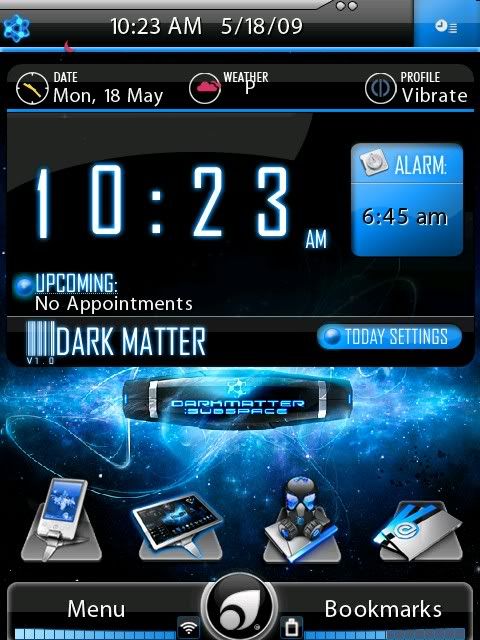 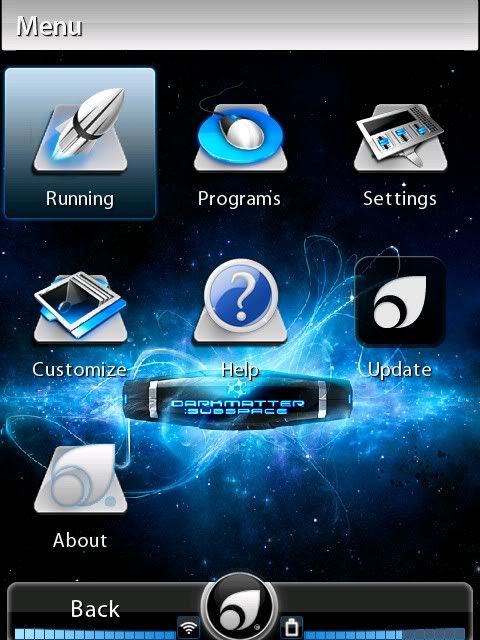 SUBSPACE Change Log [26/05/09] Updated to v1.1: Image transparency fixes. Image/Selected image pixel alignment. Original Link: Codehttp://community.pointui.com/topic/themevga-subspace-v10?replies=3#post-20154 Download Now
Show Your Support
|
|||||||||||||||||||||||||

 About Supporter


 Internal Changes
  No support by the author.
| The Following 9 Users Say Thank You to jr5416 For This Useful Post: | ||
| Comments |
|
#2
 06-18-2009, 10:03 PM
|
||||
|
||||
 Re: [VGA/QVGA] SUBSPACE v11
Some screen shots for u guys :
[IMG]  [/IMG][IMG] [/IMG][IMG] [/IMG][IMG] [/IMG][IMG] [/IMG] [/IMG]

|



|
#3
06-18-2009, 10:50 PM
|
||||
|
||||
Re: [VGA/QVGA] SUBSPACE v11
“ Originally Posted by jr5416
|

|
#4
06-18-2009, 11:08 PM
|
||||
|
||||
Re: [VGA/QVGA] SUBSPACE v11
“ Originally Posted by jr5416
|

|
#5
06-19-2009, 09:23 AM
|
||||
|
||||
Re: [VGA/QVGA] SUBSPACE v11
“ Originally Posted by Sh0wNuF
|
|
#6
06-19-2009, 10:14 AM
|
||||
|
||||
|
Re: [VGA/QVGA] SUBSPACE v11
Verry nice,also the title.Bad think is i cant instal it at my hd.i am working on it,its ready to go to my body shop ;)grtz
|
|
#7
06-19-2009, 10:15 AM
|
||||
|
||||
Re: [VGA/QVGA] SUBSPACE v11
“ Originally Posted by Longfist
|
|
#9
06-19-2009, 10:21 AM
|
||||
|
||||
Re: [VGA/QVGA] SUBSPACE v11
“ Originally Posted by Longfist
|
|
#10
09-29-2009, 12:26 PM
|
||||
|
||||
|
Re: [VGA/QVGA] SUBSPACE v11
I love this theme and in need of some help installing on my HTC touch phone. Standard ROM and almost brand new so no aplications but the standard ones on a sprint phone/ROM. Help is apprecauted so thanks in advance - Jammin
|

|
#11
09-29-2009, 12:28 PM
|
||||
|
||||
Re: [VGA/QVGA] SUBSPACE v11
“ Originally Posted by jammin
|
|
#12
09-29-2009, 12:40 PM
|
||||
|
||||
Re: [VGA/QVGA] SUBSPACE v11
“ Originally Posted by jr5416
|
|
#13
09-29-2009, 03:35 PM
|
||||
|
||||
|
Re: [VGA/QVGA] SUBSPACE v11
WEESJE, Thanks for the reply. It did say QVGA in the title so I'm assuming it will work for my touch phone. I will also download pointUI (2.1) and install. Whats the latest version and after I install it where do I put the subspace QVGA file? Thanks again.
|
|
#14
09-29-2009, 03:43 PM
|
||||
|
||||
Re: [VGA/QVGA] SUBSPACE v11
“ Originally Posted by jammin
|
|
#15
09-29-2009, 04:06 PM
|
||||
|
||||
|
Re: [VGA/QVGA] SUBSPACE v11
Thanks, when i finish work I will get straight on it...... I would start now but I have restrictions on downloading on my comp :(
|
|
#16
09-29-2009, 09:01 PM
|
||||
|
||||
Re: [VGA/QVGA] SUBSPACE v11
“ Originally Posted by jammin
|
|
#17
09-30-2009, 04:44 AM
|
||||
|
||||
Re: [VGA/QVGA] SUBSPACE v11
“ Originally Posted by D/\SH
|
|
#18
09-30-2009, 10:44 AM
|
||||
|
||||
|
Re: [VGA/QVGA] SUBSPACE v11
Yeah, At work I have an admisnistrator who restricts what programs and aplications can be put on the computers..... Thanks for the help people!
|
|
#20
09-30-2009, 02:35 PM
|
||||
|
||||
|
Re: [VGA/QVGA] SUBSPACE v11
Yeah real cool theme...... have just installed and am working it out. Does anyone have the "qvga clock updates?" They also look sweet. Thanks all the same
|
|
#21
09-30-2009, 02:41 PM
|
||||
|
||||
|
Re: [VGA/QVGA] SUBSPACE v11
[QUOTE=jr5416;381781]Some screen shots for u guys :
dam jr i know i late on this but that looks sick. that looks vary nice Last edited by CYBER WEESJE; 09-30-2009 at 06:59 PM.
|
|
#22
09-30-2009, 07:56 PM
|
||||
|
||||
|
Re: [VGA/QVGA] SUBSPACE v11
[QUOTE=DJCaSpER;416857]
“ Originally Posted by jr5416
|
|
#23
10-01-2009, 10:58 AM
|
||||
|
||||
|
Re: [VGA/QVGA] SUBSPACE v11
Jr5416. Whats a good way of changing the alarm clock? I love this theme but it has problems with the windows alarm going off or showing why it does eventually ring>? How do I install a working QVGA alarm clock? (remembering I have no computer skills or coding experience < )
|
|
#24
10-01-2009, 11:17 AM
|
||||
|
||||
Re: [VGA/QVGA] SUBSPACE v11
“ Originally Posted by jammin
|
|
#25
10-01-2009, 11:26 AM
|
||||
|
||||
|
Re: [VGA/QVGA] SUBSPACE v11
No but when the standard windows alarm goes off I cant see it. I have to go back to the main screen. Also sometimes it fails to go off. Was just wondering if there was a button or app so i didn't have to keep going through "settings" or back to windows screen to shut the dam thing off or set the alarm. thnx
|
|
#26
10-01-2009, 11:38 AM
|
||||
|
||||
Re: [VGA/QVGA] SUBSPACE v11
“ Originally Posted by jammin
|
|
#27
10-01-2009, 02:24 PM
|
||||
|
||||
|
Re: [VGA/QVGA] SUBSPACE v11
Yeah you can do this....... but its a head ache when the alarms going off to have to shut point down and then shut the alarm off. I just saw the image at the top and wondered if there was an icon to go to the alarm or shut it down without having to shut down the application?
--------- New Post Merged on 1/10/2009 at 03:29:04 -------- Ps - Do those zip files attached "FlipClockWhiteVGA.zip /FlipClockBlackVGA.zip" work on the HTC touch? I saw VGA so I assume no? (anyone savvy enough to get it to work QVGA?? ) ;o) Also its possible to see the standard alarm notices by going to <settings> > Customize >> Show notification icon. This makes things a little bit easier. Last edited by jammin; 10-01-2009 at 03:29 PM. Reason: Automerged Doublepost
|
|
#28
10-01-2009, 06:20 PM
|
||||
|
||||
Re: [VGA/QVGA] SUBSPACE v11
“ Originally Posted by jammin
|
|
#29
10-01-2009, 09:17 PM
|
||||
|
||||
|
Re: [VGA/QVGA] SUBSPACE v11
Ok ..... that sums it pretty well! Im not eligible for upgrade for another six months so im been cheap and making the most of what I can customize. Anyway because pointui runs ontop of the windows interface. When the alarm goes off it doesn't show up on the pointui interface. I have to shut the pointui thingy down and then turn off the alarm through windows.
I found a good solution earlier. This was to use the "menu" button under the pointui "settings" then hit "customize" When the menu comes up look for "show notification icon" then select yes. Now all the alarm notices, apointments and meeting info will show up on the screen on the pointui interface without having to close pointui and shut the alarm down or read the reminders. Cool theme and aplication so thanks for the help. In the meantime...... if anyone has any cool qvga stuff/aplets, lemme know!
|
|
#30
10-02-2009, 05:40 AM
|
||||
|
||||
Re: [VGA/QVGA] SUBSPACE v11
“ Originally Posted by jammin
|
  |
| Tags |
| subspace, v11, vga or qvga |

«
Previous Thread
|
Next Thread
»
| Currently Active Users Viewing This Thread: 1 (0 members and 1 guests) | |
|
|

|
Similar Threads
|
||||
| Thread | Thread Starter | Forum | Replies | Last Post |
| [Theme] [WVGA-VGA] KoMaSpace v11 FR et EN | jr5416 | Wisbar Advance Desktop | 6 | 05-23-2009 11:26 PM |
| Real WM7 Theme support QVGA, VGA n Square QVGA devices!!! | Mike20PR | QVGA (PPC & WM) Themes | 18 | 08-22-2008 12:47 PM |
| Default BlackVista2 *VGA and QVGA* | D/\SH | Wisbar Advance Themes | 16 | 04-21-2008 04:14 PM |
| DHR CommMgrPro VGA/QVGA/Square v1.1.4a | D/\SH | WM And PPC Applications | 0 | 10-05-2007 01:42 AM |
All times are GMT -4. The time now is 05:15 AM.