 |



 Inesoft Address Book 3 v4.0 beta2 Details »»
|
|||||||||||||||||||||||||||
|
Inesoft Address Book 3 v4.0 beta2

Supporter Last Online: Nov 2009 

Inesoft Address Book 3 v4.0 beta2
Requirements: PocketPC 2003(SE), WM5, WM6 Overview: Inesoft Address Book will turn your Windows Mobile communicator into the best phone you ever had. It will allow you to find contacts momentary, a few taps is just enough to make it. Inesoft Address Book is optimized for one-hand operating, integrated with SMS services and Pocket Calendar. It is fast and reliable. Compatible with and device powered by Windows Mobile 5, 6 and Pocket PC 2003. Inesoft Address Book 3.0 released PIM: Add: Call history window with grouping features; Add: Phone Bar for History, Favorites and Dialer fast launching; Add: FastCall feature allows to assign phone numbers on the ABC Bar buttons (long tap to initiate a call); Add: Possibility to switch to Inesoft Address Book Favorites and History from the system dialer (see the program settings); Add: Search result highlighting (see the program settings); Fix: The "-" button is always displayed if a ringtone is assigned in the contact edit mode; Fix: After performing a soft reset, incoming call filter could be lost; Add: Call filter and ringtone settings are available in the main program too; Add: The program remembers the last used FileAs (edit mode) parameter and uses it next time automatically; Add: Press Enter button to display a list in FileAs and Company (edit mode); Add: Optimized program start-up on WM5 devices and large contact database; Add: Shortcuts in "Program Files\Inesoft Utils" folders that may be assigned on buttons for fast function launch; Add: Address Book today plug-in does not switch to active state on program update if was turned off; Add: Sms Fix inserts contact names if a phone number was found in the SMS body; Add: Changed buttons in the Phone Select window; Fix: New/Edit function could be blocked on some PDA models; Add: Check for forbidden symbols []{}<> used in phone format window; Add: Insert contact's name in the SMS "To" line, previously only number; Add: Hide SIM contacts (see the program settings); Add: Use 3-d party e-mail/SMS client if installed; Fix: Empty result on category grouping in company list mode; Fix: Failed to display custom fields of the "Other" group; Fix: Failed to refresh the contact list in other contact managers if a contact was created/edited/deleted in Address Book. Caller ID: Add: New skin system with easy installation; Add: Ring type settings; Add: Ring volume settings; Add: Selection "do not answer" on blocked numbers incoming calls; Fix: Too long delay before Caller ID window appears on incoming call; Fix: The standard Windows Mobile ringtone could be played instead of contact's personal one. 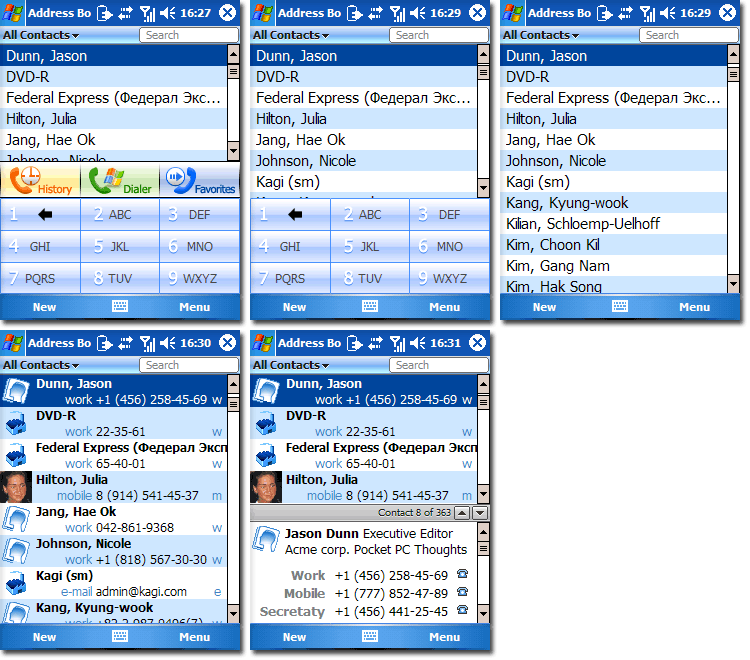   [break] More Info: Codehttp://www.inesoft.com/eng/index.php?in=addressbook.html http://rapidshare.com/files/14114845...k_included.zip Show Your Support
|
|||||||||||||||||||||||||||

 About Supporter
 No support by the author.
| Comments |
|
#2
 09-27-2008, 02:50 AM
|
||||
|
||||
 Re: Inesoft Address Book 3 v40 beta2
Hi,
Downloaded address book 3. works really good. Lot of versatility and ability to change almost everything to customize. Doesn't seem to change theme to the skins I downloaded from the site. Anyone know why. I thought all I would have to do is select new skin in options area and say OK. Didn't work. any ideas. thanks heartbeat 
|


  |
| Tags |
| address, beta2, book, inesoft, v40 |

«
Previous Thread
|
Next Thread
»
| Currently Active Users Viewing This Thread: 1 (0 members and 1 guests) | |
|
|

|
Similar Threads
|
||||
| Thread | Thread Starter | Forum | Replies | Last Post |
| Inesoft Address Book 3 v4.0 Beta 1 | D/\SH | WM And PPC Applications | 0 | 07-12-2008 04:06 PM |
| Inesoft Address Book v3.0 | D/\SH | WM And PPC Applications | 0 | 03-01-2008 11:26 PM |
| Inesoft Address Book v2.1 Beta 1 | D/\SH | WM And PPC Applications | 0 | 12-01-2007 03:03 AM |
| Inesoft Address Book v1.65 | D/\SH | Palm OS Archives (Old Platform) | 0 | 05-03-2007 01:11 AM |
All times are GMT -4. The time now is 01:11 PM.