 |



|
#1
 01-06-2009, 06:05 AM
|
||||
|
||||
 Enable Hidden BootScreen in Windows Vista
The Windows Vista BootScreen is pointless, but Microsoft decided to hide a more visually appealing boot screen that can easily be enabled with very little trouble. I'm not sure why they didn't make the boot screen better.
If you really want a better boot screen, Here's the default boot screen:  And here's the hidden one, called "Aurora"  All you have to do is type msconfig into the start menu search box, and hit enter. Click the Boot tab, and then check the "No GUI boot" checkbox. 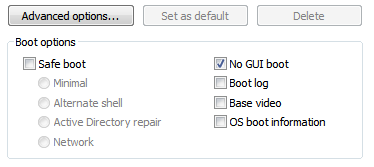 Hit OK and reboot the computer. You should see the new boot screen immediately. GRTZ WEESJE Wckediden Bulletin@Wckediden Last edited by CYBER WEESJE; 01-06-2009 at 07:33 AM. 
|





| The Following 5 Users Say Thank You to CYBER WEESJE For This Useful Post: | ||
|
enigmatic (01-06-2009), halfdanarson (01-06-2009), Metalmayhem (01-07-2009), nadcicle (01-06-2009), Sh0wNuF (01-07-2009)
| ||
|
#2
01-08-2009, 07:38 PM
|
||||
|
||||
|
Re: Enable Hidden BootScreen in Windows Vista
sweet... well i kno this works for xp i dont kno if it works for vista but if you do this(Click on Start -> Run and type "telnet towel.blinkenlights.nl" no quotation marks) you will see a hidden movie in your computer, theres no sounds and i swear nothing will happen to you computer...
|

|
#3
01-08-2009, 08:53 PM
|
||||
|
||||
|
Re: Enable Hidden BootScreen in Windows Vista
works just as described on vista ultimate 64 bit.
|
  |
| Tags |
| bootscreen, enable, hidden, vista, windows |

«
Previous Thread
|
Next Thread
»
| Currently Active Users Viewing This Thread: 1 (0 members and 1 guests) | |
|
|

 Similar Threads
|
||||
| Thread | Thread Starter | Forum | Replies | Last Post |
| [ ISSUE SOLVED ] Hidden window folder on TP2 vista x64 | bigp750 | HTC Touch Pro 2 | 5 | 10-28-2009 10:30 PM |
| [TUTORIAL] Enable Windows Vista 32bit to support more than 4GB of RAM | CYBER WEESJE | Society Cell Talk | 0 | 01-20-2009 01:53 PM |
All times are GMT -4. The time now is 11:29 AM.