 |



 [APP][Jul31v025b] High Resolution Wallpaper Slider Editor [all tabs] C Details »»
|
|||||||||||||||||||||||||||
|
[APP][Jul31v025b] High Resolution Wallpaper Slider Editor [all tabs] C

Supporter Last Online: Nov 2009 

hi guys i take no credit for this found here
Codehttp://forum.xda-developers.com/showthread.php?t=503511&highlight=hdwall Tested on HTC Touch HD, HTC Touch Diamond 2, HTC Touch Pro 2, Dutty's Extreme ROMs, Manila v2.0, v2.1 Portrait & Landscape Mode .NET Framework v3.5 required .NET Compact Framework v3.5 required for HDWallS Creating a high resolution wallpaper in 3 steps: 1. Load Image - Press "Load" or drag&drop the image, select crop & resize options or "Auto Crop & Resize" - optional: Press "Landscape" & repeat step 1 2. Create CAB File - Press "Create CAB", select "Include Landscape / Portrait Wallpapers", press "Convert", then "Create CAB". 3. Copy and install the CAB on your device - Please select the Profile for your device under "Config". You can press the "Set default" button on the right to make it your default profile. If you get a white background, select the "TouchFLO v2+ - No Compression" Profile 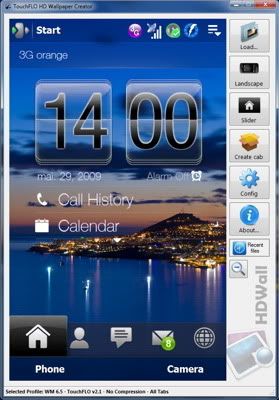 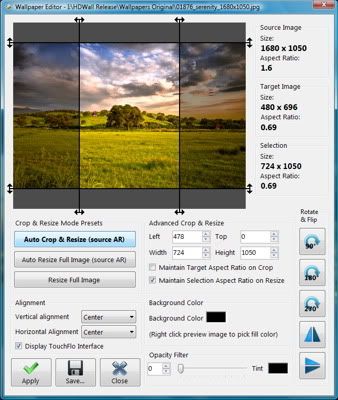 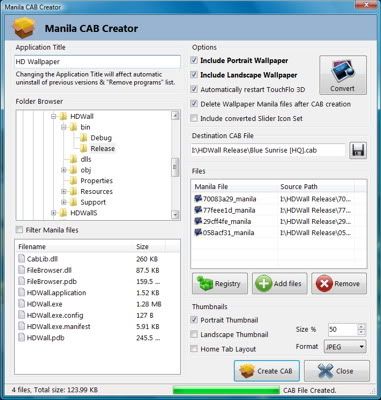 HDWallS - CAB Wallpaper Browser - Copy cab wallpapers created by HDWall > v0.24b in a folder on your device, e.g. "\Storage Card\Wallpapers CAB". Copy cab files & the thumbnails created by HDWall Cab Creator, e.g. "MyWallpaper.cab" & "MyWallpaper-P.jpg". If no thumbnail is found, a standard icon will be displayed. - Install HDWallS_v0.24b.cab (from the HDWall folder), start the application from the Start Menu. - On the first run, select the cab wallpaper folder (can be changed later from "Options"). - Select the wallpaper and press "Set Wallpaper" - Install only cab files created with HDWall > 0.24b, cab files created with previous versions & "Restart TouchFLO" enabled may freeze during installation. 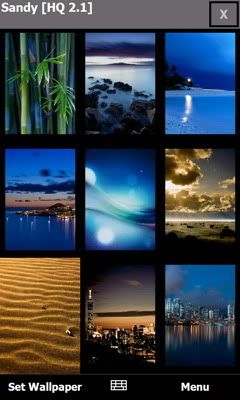 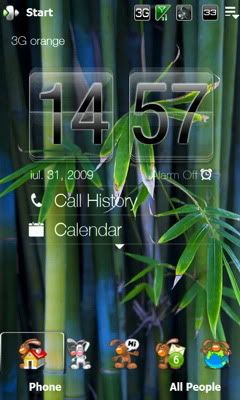 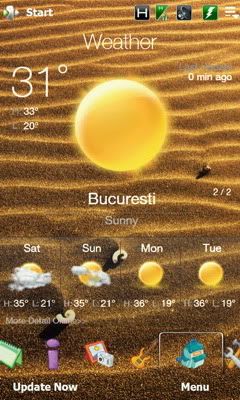 Slider Icon Editor 1. Press "Slider" in the Main Window 2. Select the icon by using the slider 3. Click the icons on the right or drag & drop .ico or .png icons. 4. Press "Convert" - the selected profile options will be used. 5. Go to "Create CAB", Enter "Slider Icon Set" under "Application Title", check "Include slider icon set" & press "Create cab". 6. Install cab on device. 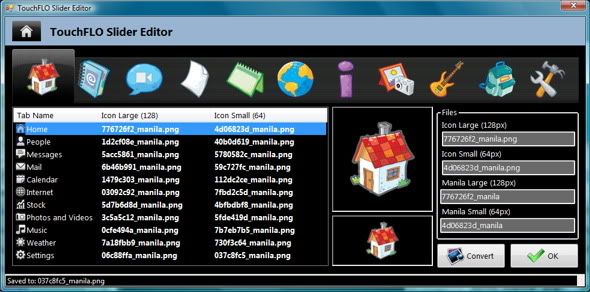 The fine print: - Install HDWall on your PC, not on the device - Install HDWallS on your device, not on the PC - Select an appropriate name in "Application Title" in the "Create CAB" Window to avoid uninstallation of other cabs with the same name. - Select "default wallpaper" in TouchFlo 3D - There is no need to restart the device after CAB installation - Disable any "background for all tabs" addons - Disable the default wallpaper for the Home Tab in Manila v2.1 by removing the data found at HKCU\Software\HTC\Manila\HomeBackgroundPath (don't delete the key, just the valuedata) ChangeLog: v0.25b Jul.31 - New: WM 6.5 Profile (beta) - Skinning of WM 6.5 Taskbar & Softkeybar - Added Profile for TouchFLO v2.5 BETA - Slider Editor: Added the very popular Programs Tab - Removed Folder Browser Component to prevent crashes v0.24b Jul.24 - TouchFLO Slider Editor - Selection for standard TouchFLO v2.1 Icon Set - Import multipage ico & png icons - Conversion of slider icons based on current profile options - HDWallS Wallpaper Browser - Display wallpaper thumbnails - Silent cab installation - Select cab folder - Works with cabs created by HDWall > 0.24b with "Restart TouchFLO" enabled - Fix: Recompiled SetupDLL v0.2b, fix for freeze during TouchFLO restart - Improved JPEG Thumbnail Quality - Increased CompositingQuality v0.22b Jul.05 - Added Manila Patch for different Home Tab & Manila Start Menu Wallpapers by Co0kieMonster - Updated Profiles for All Tabs, Home Tab & Start Menu - Convert Button in Create Cab Window - Small size mode for smaller desktop resolutions (Main Window & Image Editor) - CAB Registry Editor ... How to get HIGH QUALITY wallpaper on your Touch HD! by Rozenthal CFC - THE Manila/TF3D Image Editor by Chainfire [Manila Patch] High Quality Wallpaper for Home Tab & Manila Start Menu by Co0kieMonster  Rabbit Slider Icon Set - Attachment 208488 - Icon source here.  DeskToon Slider Icon Set - Attachment 208557 - Icon source here.  to support free software :) & don't be afraid to say "thank you" in the thread... to support free software :) & don't be afraid to say "thank you" in the thread...GRTZ CYBER WEESJE ADMINISTRATOR@Wckediden HIT THANKS ON THE WAY OUT Download Now
Show Your Support
|
|||||||||||||||||||||||||||

 About Supporter
 No support by the author.
  |
| Tags |
| appjulb, editor, high, resolution, slider, tabs, wallpaper |

«
Previous Thread
|
Next Thread
»
| Currently Active Users Viewing This Thread: 1 (0 members and 1 guests) | |
|
|

|
Similar Threads
|
||||
| Thread | Thread Starter | Forum | Replies | Last Post |
| [UPDATES] [APP][WM65]CDigiClock v046 [Test for All Resolution] | jr5416 | WM And PPC Applications | 4 | 06-25-2009 10:04 AM |
| [RELEASE] [APP] [May29v016b] High resolution wallpaper editor for all tabs (picture | jr5416 | WM And PPC Applications | 2 | 05-30-2009 01:09 AM |
| [WM65]Titanium CommManager v022 test for All Resolution | CYBER WEESJE | Mobile Locker | 1 | 05-19-2009 08:14 PM |
| [APP][WM65]Titanium CommManager [v022] test for All Resolution | BucksFloBx | VGA Titanium / 6.5 Themes | 0 | 05-12-2009 10:51 PM |
| [App][WM65]CLaunch v01[Test for all resolution] | jr5416 | Mobile Locker | 0 | 05-12-2009 04:30 PM |
All times are GMT -4. The time now is 05:27 AM.