 |



|
#1
 06-27-2024, 10:16 AM
|
||||
|
||||
 Heres how to enable Gemini Nano in Chrome for offline, instant chats
 Credit: Edgar Cervantes / Android Authority
Googles Gemini Nano language model is small enough to fit and run entirely on a Pixel 8, but we havent seen many use cases for it yet. The model is only used for features like Gboards Smart Reply or AI-generated summaries in the Recorder app. Luckily, Google seems to have grander ambitions on the desktop side as it has now started testing a Gemini Nano integration within Chrome. This means you can converse with a modern large language model entirely within a web browser  even if youre offline! Gemini Nano for Chrome was announced just last month, with Google promising to open up access to developers for testing soon. The feature was then spotted in version 127 of Chrome Canary a few weeks ago and enterprising developers have already created web apps that showcase the local models capabilities. One such demo comes courtesy of Twitter/X user Morten Just, who has demonstrated how quickly Gemini Nano can respond. This is fast. Chrome running Gemini locally on my laptop. 2 lines of code. pic.twitter.com/R8twlDbUD2 The video shows Gemini Nano responding in real-time, with latency figures ranging in the low hundreds of milliseconds. However, the developer admitted to running the demo on an Apple Silicon M3 Max-powered Mac, which is quite a bit more performant than the average desktop. Still, were talking about receiving a reply faster than the average human response time so even slower hardware should be capable of handling Gemini Nano. Case in point: I installed Chrome Canary on my desktop thats equipped with an AMD Ryzen 5600X CPU and an Nvidia RTX 3060 Ti GPU. These are mid-range PC specs but enough to run larger models like Metas Llama 3. How to enable Gemini Nano in Chrome: My experience After enabling a few feature flags within Chrome Canary, I could see persistent internet traffic indicating that the browser had started downloading the model. Google doesnt offer an interface to chat with Gemini Nano yet, but Twitter user Lightning Joyce has developed an open-source web app that you can use in the meantime. It looks like any other chatbot on the surface, only stripped back to the bare essentials. Simply load the page, disconnect your computer from the internet, and you can test Gemini Nanos offline performance. With the prep out of the way, how did the model perform on my system? Shockingly well and nearly on par with the demo video above. The speed isnt groundbreaking by itself, though, as my hardware could output 50 tokens per second (roughly equivalent to 50 words per second) while processing responses via Llama 3. Instead, the key point here is that Gemini Nano can be used as a makeshift chatbot and will easily run on a wider range of hardware due to its smaller size. 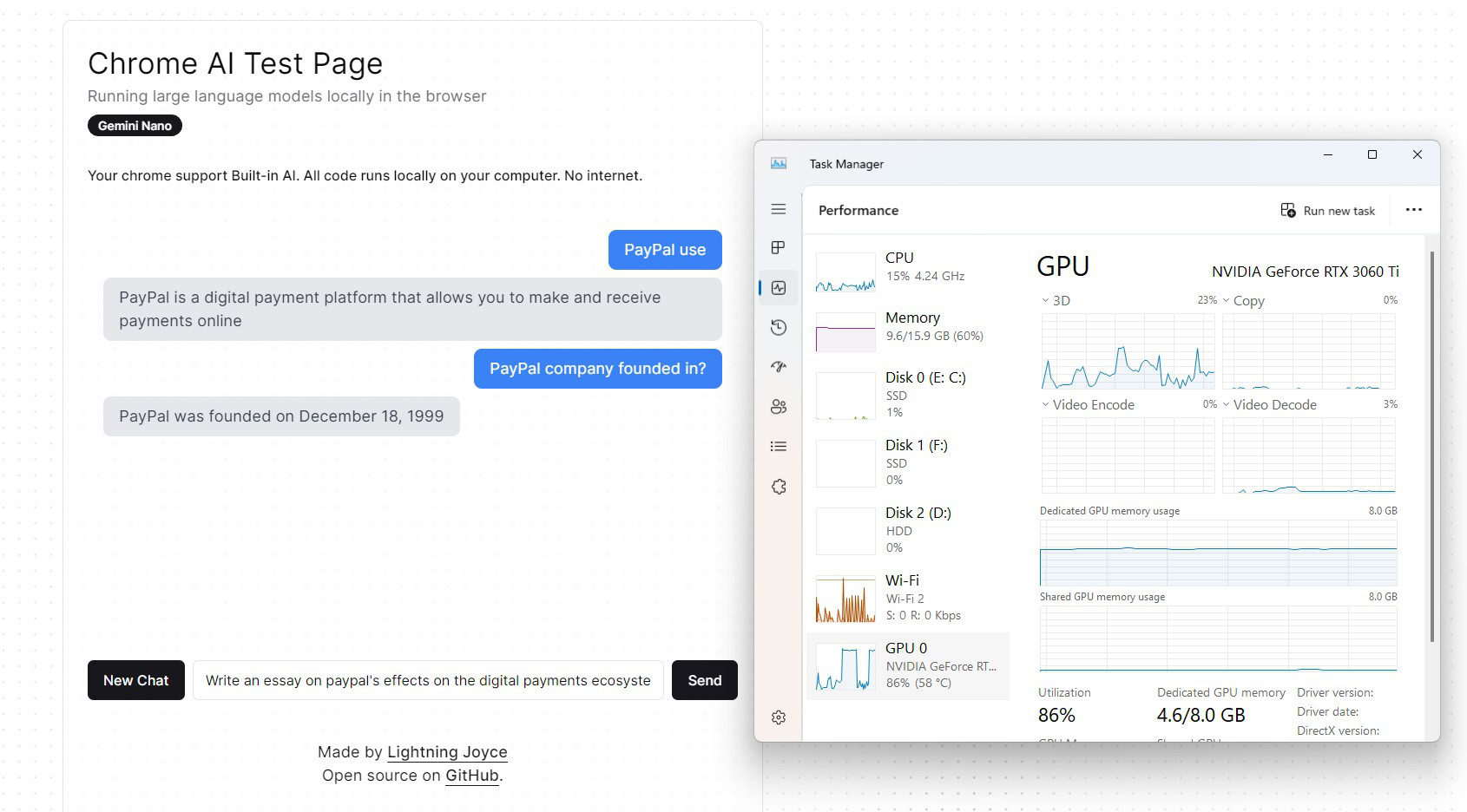 Credit: Calvin Wankhede / Android Authority However, I noticed that Gemini Nano would fail to respond whenever I entered an open-ended prompt like “Write an essay on…ââââ‚ ¬šÂ¬Ã‚ or “History of Android.†Whenever this happened, my computers GPU usage would spike  up to 90% load for a handful of seconds before settling back down. This could be a bug in the web app, but its worth remembering that Gemini Nano in Chrome is an experimental feature after all. The model could handle single-paragraph responses just fine. The good news is that Gemini Nano will only take up 2GB of your GPUs video memory (or RAM if your computer doesnt have dedicated graphics hardware). And even with the other caveats above, Gemini Nano remains impressively quick and usable. Not to mention, having it run entirely within Chrome could make it much more accessible than any other offline language model weve seen. If youd like to use Gemini Nano on your own machine, follow these steps:
More... 
|





  |
«
Previous Thread
|
Next Thread
»
| Currently Active Users Viewing This Thread: 1 (0 members and 1 guests) | |
|
|

 Similar Threads
|
||||
| Thread | Thread Starter | Forum | Replies | Last Post |
| Chrome may soon give you an instant web store trust assessment | phillynews215 | Digital Scoop | 0 | 11-29-2024 06:06 PM |
| Gemini Live may streamline how you pause and resume chats (APK teardown) | phillynews215 | Digital Scoop | 0 | 11-22-2024 01:21 PM |
| [NEWS] You can now share images to Gemini, while Gemini Nano opens up to app devel | phillynews215 | Just About Digital Community | 0 | 10-02-2024 04:13 PM |
| Gemini Nano is finally coming to new Android phones, starting with the Xiao | phillynews215 | Digital Scoop | 0 | 09-26-2024 10:41 AM |
| Your Android devices can now share an instant hotspot or a call; heres how | phillynews215 | Digital Scoop | 0 | 09-07-2024 05:37 PM |
All times are GMT -4. The time now is 06:42 AM.